ESP32 Based IoT Dual Load Control System Using SIM900A | Web, SMS & Missed Call Automation
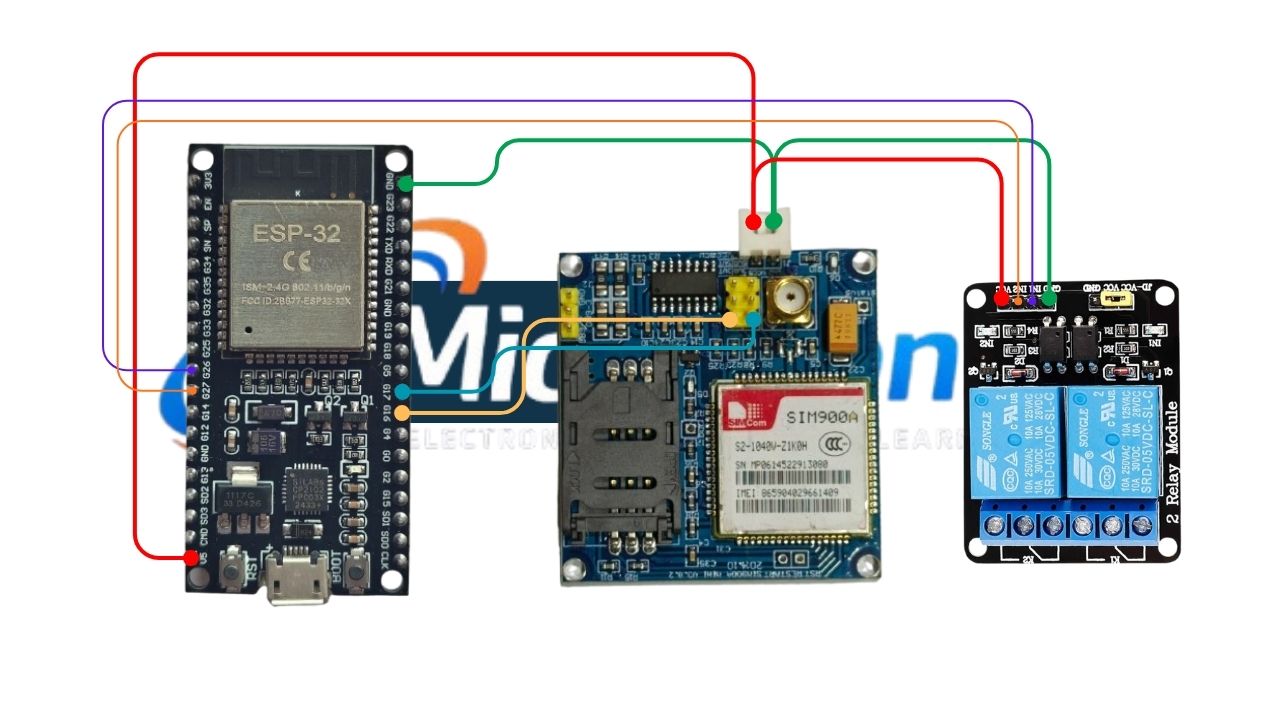
Table of Contents
Project Overview
The ESP32 Based IoT Dual Load Control System is a smart automation project designed to control two electrical loads remotely using multiple control methods. This system combines the power of the ESP32 Wi-Fi microcontroller with the SIM900A GSM module to provide flexible and reliable remote load management.
Users can control two independent electrical loads through a web-based dashboard, SMS commands, and missed calls from authorized mobile numbers.
The system also monitors AC power availability and Wi-Fi connectivity, providing real-time status information through its web interface and SMS notifications.
This project is suitable for smart home automation, remote electrical equipment control, industrial applications, and IoT-based automation experiments.
Main Features
- Dual Load Control: Independently control two electrical loads.
- Wi-Fi Web Dashboard: Control both relays from a web browser.
- GSM-Based Control: Operate loads using SMS commands.
- Missed Call Automation: Toggle individual loads by calling from authorized phone numbers.
- AC Power Monitoring: Detect whether AC power is available.
- Wi-Fi Monitoring: Monitor Wi-Fi connection status.
- SMS Notifications: Receive notifications about load operations and Wi-Fi connection changes.
- Remote Status Checking: Get AC, Wi-Fi, and load status through SMS.
- Periodic SIM Balance Check: Automatically check SIM balance and SMS memory status every three days.
- Authorized Access: Only two predefined administrator numbers can control the loads through GSM.
How Does This Project Work?
The ESP32 acts as the main controller of the system. It communicates with the SIM900A GSM module through UART2 serial communication.
The system provides three different control methods.
1. Wi-Fi Web-Based Control
After connecting the ESP32 to a Wi-Fi network, users can access the web dashboard using the ESP32's local IP address.
The dashboard displays:
- AC Power Status
- Wi-Fi Connection Status
- Load 1 Status
- Load 2 Status
Users can turn each load ON or OFF directly from the dashboard.
2. SMS-Based Load Control
The SIM900A GSM module allows users to control the loads through SMS commands.
The system accepts the following commands from authorized mobile numbers:
| SMS Command | Function |
|---|---|
| LOAD1 ON | Turn ON Load 1 |
| LOAD1 OFF | Turn OFF Load 1 |
| LOAD2 ON | Turn ON Load 2 |
| LOAD2 OFF | Turn OFF Load 2 |
| STATUS | Get complete system status |
When a valid command is received, the ESP32 processes it and controls the corresponding relay.
3. Missed Call-Based Control
One of the interesting features of this project is missed call-based automation.
Two administrator phone numbers are configured in the program.
- Calling from Administrator 1 toggles Load 1.
- Calling from Administrator 2 toggles Load 2.
The system identifies the caller through GSM Caller ID and automatically rejects the call after receiving the caller information.
This allows users to control electrical loads without sending SMS messages.
Required Components
| No. | Component Name | Quantity |
|---|---|---|
| 1 | ESP32 Development Board (38 Pin) | 1 |
| 2 | SIM900A GSM Module | 1 |
| 3 | 2-Channel Relay Module | 1 |
| 4 | AC Detection Circuit | 1 |
| 5 | Status LED | 1 |
| 6 | GSM Antenna | 1 |
| 7 | Power Supply for ESP32 | 1 |
| 8 | Suitable Power Supply for SIM900A | 1 |
| 9 | Connecting Wires | As required |
| 10 | Electrical Loads | 2 |
Circuit Connections
The following pin configuration is used in the project.
| ESP32 Pin | Connected Component |
|---|---|
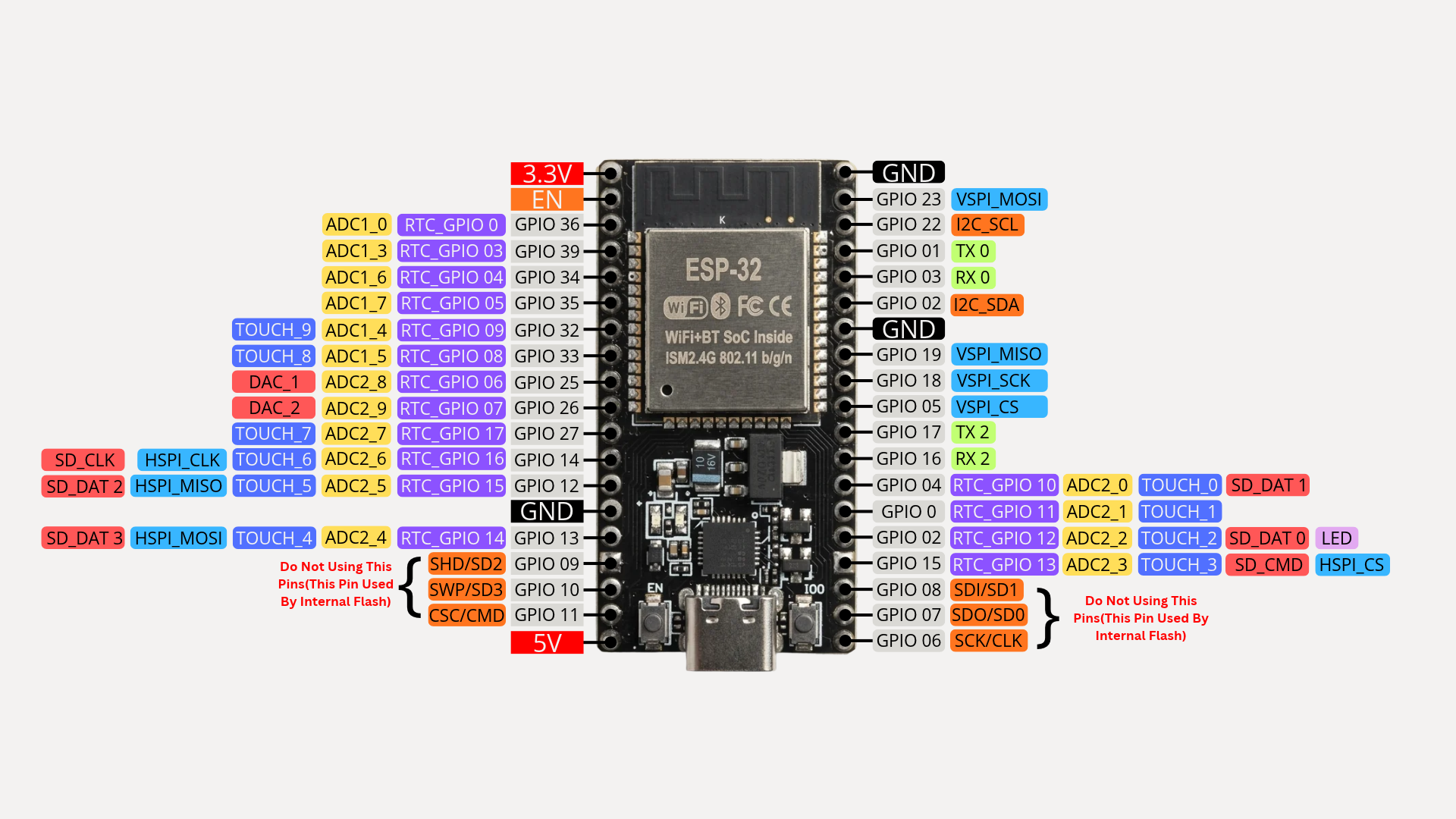
| GPIO 34 | AC Detection Input |
| GPIO 26 | Relay 1 Input |
| GPIO 27 | Relay 2 Input |
| GPIO 2 | Status LED |
| GPIO 16 (RX2) | SIM900A TXD |
| GPIO 17 (TX2) | SIM900A RXD |
| GND | Common Ground |
Important: The AC detection circuit requires a properly isolated and protected sensing arrangement. Never connect 220V AC directly to an ESP32 GPIO pin.
The SIM900A also requires a stable power supply capable of handling its high current bursts during GSM transmission.
System Specifications
| Parameter | Description |
|---|---|
| Main Controller | ESP32 |
| GSM Module | SIM900A |
| Communication | Wi-Fi, GSM, SMS |
| Serial Communication | UART2 |
| GSM Baud Rate | 9600 |
| Number of Loads | 2 |
| Relay Control | Active LOW |
| Web Server Port | 80 |
| AC Monitoring | Digital Input |
| Remote Control | Web, SMS & Missed Call |
| Administrator Numbers | 2 |
Applications
This project can be used in different automation applications, such as:
- Smart Home Automation
- Remote Electrical Load Management
- Agricultural Pump Control
- Remote Lighting Control
- Small Industrial Automation
- Remote Equipment Switching
- IoT-Based Electrical Control Systems
Project Advantages
- Multiple remote-control methods in one system.
- No dedicated cloud server or paid IoT platform is required.
- Local Wi-Fi dashboard for convenient operation.
- GSM control works independently of internet access.
- Two independent electrical loads can be controlled.
- SMS-based system monitoring.
- Administrator-based GSM command authorization.
Future Development Possibilities
The project can be upgraded with additional features:
- Mobile application integration.
- Energy consumption monitoring.
- Voltage and current measurement.
- More relay channels.
- Cloud-based monitoring.
- Custom domain-based remote access.
- Automatic load scheduling.
Conclusion
The ESP32 Based IoT Dual Load Control System demonstrates how Wi-Fi and GSM technologies can be combined to build a flexible remote automation solution.
By integrating web-based control, SMS commands, and missed call automation, this project provides multiple ways to operate electrical equipment remotely.
It is an excellent electronics and IoT project for students, hobbyists, engineers, and anyone interested in developing practical automation systems.
Source Code
ESP32_LoadControl_Builtin_WiFi.inoDownload
#include <WiFi.h>
#include <WebServer.h>
#include <HardwareSerial.h>
// WiFiManager.h আর দরকার নেই, কারণ WiFi এখন কোডের মধ্যেই বিল্টইন থাকবে

// ---------------- WIFI CREDENTIALS (হার্ডকোডেড, পরিবর্তন করে re-upload করুন) ----------------
const char* WIFI_SSID     = "YOUR_WIFI_SSID";     // এখানে আপনার WiFi নাম দিন
const char* WIFI_PASSWORD = "YOUR_WIFI_PASSWORD"; // এখানে আপনার WiFi পাসওয়ার্ড দিন

// ---------------- ADMIN NUMBERS (hardcoded, edit + re-upload to change) ----------------
const char* ADMIN_NUMBER_1 = "+8801878924242"; // controls Load 1 by calling/SMS
const char* ADMIN_NUMBER_2 = "+8801923996953"; // controls Load 2 by calling/SMS

// ---------------- PIN CONFIG ----------------
#define AC_DETECT_PIN     34
#define LOAD_RELAY1_PIN   26
#define LOAD_RELAY2_PIN   27
#define STATUS_LED_PIN    2

#define SIM900_RX_PIN 16   // ESP32 RX2 <- SIM900A TXD
#define SIM900_TX_PIN 17   // ESP32 TX2 -> SIM900A RXD

// বেশিরভাগ সস্তা 2-Channel Relay Module "Active-LOW" (IN পিনে LOW দিলে রিলে ON হয়)।
// আপনার মডিউল যদি উল্টো (HIGH = ON) হয়, তাহলে এটা false করে দিন।
#define RELAY_ACTIVE_LOW true

// রিলে অন/অফ করার জন্য এই একটা ফাংশন ব্যবহার হবে সব জায়গায়, যাতে লজিক একবারই ঠিক করলে চলে
void writeRelay(int pin, bool onState) {
  if (RELAY_ACTIVE_LOW) digitalWrite(pin, onState ? LOW : HIGH);
  else                  digitalWrite(pin, onState ? HIGH : LOW);
}

HardwareSerial sim900(2); // UART2
WebServer     server(80); // built-in web dashboard, replaces Blynk

// WiFi রিকানেক্ট রিট্রাই ইন্টারভাল
const unsigned long WIFI_RETRY_INTERVAL = 10UL * 1000UL; // ১০ সেকেন্ড পর পর রিট্রাই

// পিরিয়ডিক ব্যালেন্স/SMS-count চেক ইন্টারভাল (মিলিসেকেন্ড)
const unsigned long BALANCE_CHECK_INTERVAL = 3UL * 24UL * 60UL * 60UL * 1000UL; // প্রতি ৩ দিন

// ---------------- STATE VARIABLES ----------------
bool acStatus         = true;
bool lastAcStatus      = true;
bool wifiConnected     = false;
bool lastWifiConnected  = false;
bool load1State        = false;
bool load2State        = false;

unsigned long lastBalanceCheck = 0;
String sim900Buffer  = "";

// ==================================================
// শুধু হার্ডকোডেড SSID/PASSWORD দিয়ে WiFi কানেক্ট করে। কোনো AP config portal খুলবে না।
void setupWifi() {
  WiFi.mode(WIFI_STA);
  WiFi.begin(WIFI_SSID, WIFI_PASSWORD);

  Serial.print("Connecting to WiFi: ");
  Serial.println(WIFI_SSID);

  unsigned long startAttempt = millis();
  const unsigned long connectTimeout = 20000; // প্রথমবার ২০ সেকেন্ড চেষ্টা করবে

  while (WiFi.status() != WL_CONNECTED && millis() - startAttempt < connectTimeout) {
    delay(500);
    Serial.print(".");
  }
  Serial.println();

  wifiConnected = (WiFi.status() == WL_CONNECTED);
  if (wifiConnected) {
    Serial.print("WiFi Connected. IP: ");
    Serial.println(WiFi.localIP());
  } else {
    Serial.println("WiFi connect failed, will keep retrying in background (loop).");
  }
}

// ==================================================
// -------------- WEB DASHBOARD (replaces Blynk) --------------
String htmlPage() {
  String html = "<!DOCTYPE html><html><head><meta name='viewport' content='width=device-width, initial-scale=1'>";
  html += "<title>ESP32 Load Control</title><style>";
  html += "body{font-family:Arial,sans-serif;background:#111;color:#eee;text-align:center;padding:20px;}";
  html += "h2{color:#4CAF50;} .card{background:#1e1e1e;border-radius:10px;padding:15px;margin:15px auto;max-width:400px;}";
  html += ".status{font-size:16px;margin:6px 0;} .ok{color:#4CAF50;} .bad{color:#f44336;}";
  html += "button{font-size:18px;padding:12px 25px;margin:8px;border:none;border-radius:8px;cursor:pointer;}";
  html += ".on{background:#4CAF50;color:#fff;} .off{background:#f44336;color:#fff;}";
  html += "</style></head><body>";
  html += "<h2>ESP32 Load Control</h2>";

  html += "<div class='card'>";
  html += "<div class='status'>AC Power: <span class='" + String(acStatus ? "ok" : "bad") + "'>" + String(acStatus ? "OK" : "NOT PRESENT") + "</span></div>";
  html += "<div class='status'>WiFi: <span class='" + String(wifiConnected ? "ok" : "bad") + "'>" + String(wifiConnected ? "Connected" : "Disconnected") + "</span></div>";
  html += "</div>";

  html += "<div class='card'>";
  html += "<div class='status'>Load 1: <span class='" + String(load1State ? "ok" : "bad") + "'>" + String(load1State ? "ON" : "OFF") + "</span></div>";
  html += "<a href='/load1/on'><button class='on'>Load1 ON</button></a>";
  html += "<a href='/load1/off'><button class='off'>Load1 OFF</button></a>";
  html += "</div>";

  html += "<div class='card'>";
  html += "<div class='status'>Load 2: <span class='" + String(load2State ? "ok" : "bad") + "'>" + String(load2State ? "ON" : "OFF") + "</span></div>";
  html += "<a href='/load2/on'><button class='on'>Load2 ON</button></a>";
  html += "<a href='/load2/off'><button class='off'>Load2 OFF</button></a>";
  html += "</div>";

  html += "</body></html>";
  return html;
}

void handleRoot()      { server.send(200, "text/html", htmlPage()); }
void handleLoad1On()   { setLoad1(true,  "web"); server.sendHeader("Location", "/"); server.send(303); }
void handleLoad1Off()  { setLoad1(false, "web"); server.sendHeader("Location", "/"); server.send(303); }
void handleLoad2On()   { setLoad2(true,  "web"); server.sendHeader("Location", "/"); server.send(303); }
void handleLoad2Off()  { setLoad2(false, "web"); server.sendHeader("Location", "/"); server.send(303); }

// simple JSON status endpoint, handy if you ever want to poll it (e.g. from a script)
void handleStatusJson() {
  String json = "{";
  json += "\"ac\":" + String(acStatus ? "true" : "false") + ",";
  json += "\"wifi\":" + String(wifiConnected ? "true" : "false") + ",";
  json += "\"load1\":" + String(load1State ? "true" : "false") + ",";
  json += "\"load2\":" + String(load2State ? "true" : "false");
  json += "}";
  server.send(200, "application/json", json);
}

void setupWebServer() {
  server.on("/", handleRoot);
  server.on("/load1/on", handleLoad1On);
  server.on("/load1/off", handleLoad1Off);
  server.on("/load2/on", handleLoad2On);
  server.on("/load2/off", handleLoad2Off);
  server.on("/status", handleStatusJson);
  server.begin();
}

// ==================================================
void setup() {
  Serial.begin(115200);

  pinMode(AC_DETECT_PIN, INPUT);       // external 10k pull-down already fitted
  pinMode(LOAD_RELAY1_PIN, OUTPUT);
  pinMode(LOAD_RELAY2_PIN, OUTPUT);
  pinMode(STATUS_LED_PIN, OUTPUT);

  writeRelay(LOAD_RELAY1_PIN, false); // Load 1 OFF at boot
  writeRelay(LOAD_RELAY2_PIN, false); // Load 2 OFF at boot

  sim900.begin(9600, SERIAL_8N1, SIM900_RX_PIN, SIM900_TX_PIN);
  delay(3000);
  initSim900();

  setupWifi();
  setupWebServer();

  if (wifiConnected) {
    Serial.print("Web dashboard ready at: http://");
    Serial.println(WiFi.localIP());
  }

  acStatus = digitalRead(AC_DETECT_PIN);
  lastAcStatus = acStatus;
  lastWifiConnected = wifiConnected;

  notifyAdmins("System started. AC: " + String(acStatus ? "OK" : "NOT PRESENT") +
               " | WiFi: " + String(wifiConnected ? "Connected" : "Not connected"));
}

// ==================================================
void loop() {
  server.handleClient();

  checkAcStatus();
  checkWifiStatus();
  checkSim900Events();
  handlePeriodicBalanceCheck();

  static unsigned long lastReconnectAttempt = 0;
  if (WiFi.status() != WL_CONNECTED && millis() - lastReconnectAttempt > WIFI_RETRY_INTERVAL) {
    lastReconnectAttempt = millis();
    WiFi.begin(WIFI_SSID, WIFI_PASSWORD); // হার্ডকোডেড ক্রেডেনশিয়াল দিয়ে বারবার রিট্রাই করবে
  }
}

// ================= NOTIFY HELPER =================
void notifyAdmins(String message) {
  sendSMS(ADMIN_NUMBER_1, message);
  sendSMS(ADMIN_NUMBER_2, message);
}

// ================= WIFI STATUS =================
void checkWifiStatus() {
  wifiConnected = (WiFi.status() == WL_CONNECTED);
  if (wifiConnected != lastWifiConnected) {
    lastWifiConnected = wifiConnected;
    notifyAdmins(wifiConnected ? "WiFi Connected" : "WiFi Disconnected");
  }
}

// ================= AC DETECTION =================
// NOTE: AC lost/restored SMS notification has been removed as requested.
// Status is still tracked here (used by the web dashboard + SMS "STATUS" command).
void checkAcStatus() {
  acStatus = digitalRead(AC_DETECT_PIN);
  if (acStatus != lastAcStatus) {
    lastAcStatus = acStatus;
    // (SMS notification intentionally removed here)
  }
}

// ================= LOAD CONTROL (shared by web, call, SMS) =================
void setLoad1(bool state, String source) {
  load1State = state;
  writeRelay(LOAD_RELAY1_PIN, load1State);
  notifyAdmins(String("Load 1 turned ") + (load1State ? "ON" : "OFF") + " (via " + source + ")");
}

void setLoad2(bool state, String source) {
  load2State = state;
  writeRelay(LOAD_RELAY2_PIN, load2State);
  notifyAdmins(String("Load 2 turned ") + (load2State ? "ON" : "OFF") + " (via " + source + ")");
}

void toggleLoad1FromCall() { setLoad1(!load1State, "call"); }
void toggleLoad2FromCall() { setLoad2(!load2State, "call"); }

// ================= SIM900A CORE =================
void initSim900() {
  sendAtCommand("AT", 1000);
  sendAtCommand("ATE0", 1000);              // echo off
  sendAtCommand("AT+CMGF=1", 1000);         // text mode SMS
  sendAtCommand("AT+CNMI=2,2,0,0,0", 1000); // deliver SMS directly to serial
  sendAtCommand("AT+CLIP=1", 1000);         // caller ID on incoming call
}

String sendAtCommand(const char* cmd, unsigned long waitMs) {
  sim900.println(cmd);
  unsigned long start = millis();
  String response = "";
  while (millis() - start < waitMs) {
    while (sim900.available()) response += (char)sim900.read();
  }
  return response;
}

void sendSMS(const char* number, String message) {
  if (strlen(number) == 0) return;
  sim900.println("AT+CMGF=1");
  delay(200);
  sim900.print("AT+CMGS=\"");
  sim900.print(number);
  sim900.println("\"");
  delay(300);
  sim900.print(message);
  delay(100);
  sim900.write(26); // Ctrl+Z to send
  delay(3000);
}

void sendSMS(String number, String message) { sendSMS(number.c_str(), message); }

// Extracts the quoted phone number from a +CLIP: or +CMT: line
String extractPhoneNumber(String line) {
  int firstQuote = line.indexOf('"');
  int secondQuote = line.indexOf('"', firstQuote + 1);
  if (firstQuote < 0 || secondQuote < 0) return "";
  return line.substring(firstQuote + 1, secondQuote);
}

// Handles both incoming calls (via +CLIP caller ID) and incoming SMS (+CMT) on one
// shared serial stream so bytes are never missed between the two parsers.
void checkSim900Events() {
  static bool expectingSmsBody = false;
  static String smsSender = "";

  while (sim900.available()) {
    char c = sim900.read();
    sim900Buffer += c;
    if (c == '\n') {
      String line = sim900Buffer;
      line.trim();

      if (expectingSmsBody) {
        processSmsCommand(smsSender, line);
        expectingSmsBody = false;
      } else if (line.indexOf("+CLIP:") >= 0) {
        String caller = extractPhoneNumber(line);
        handleIncomingCall(caller);
      } else if (line.indexOf("+CMT:") >= 0) {
        smsSender = extractPhoneNumber(line);
        expectingSmsBody = true; // message body arrives on the next line
      }
      sim900Buffer = "";
    }
    if (sim900Buffer.length() > 200) sim900Buffer = ""; // overflow guard
  }
}

// Caller ID decides which relay to toggle. Call is rejected right away (no answer),
// so it costs the caller nothing beyond a brief ring.
void handleIncomingCall(String caller) {
  sendAtCommand("ATH", 800); // reject / hang up immediately
  if (caller.length() == 0) return;

  if (caller == String(ADMIN_NUMBER_1)) {
    toggleLoad1FromCall();
  } else if (caller == String(ADMIN_NUMBER_2)) {
    toggleLoad2FromCall();
  }
}

// Only ADMIN_NUMBER_1 / ADMIN_NUMBER_2 SMS commands are accepted, everything else ignored.
// Supported: LOAD1 ON/OFF, LOAD2 ON/OFF, STATUS
void processSmsCommand(String sender, String body) {
  if (sender != String(ADMIN_NUMBER_1) && sender != String(ADMIN_NUMBER_2)) return;

  body.trim();
  body.toUpperCase();

  if (body == "LOAD1 ON") setLoad1(true, "SMS");
  else if (body == "LOAD1 OFF") setLoad1(false, "SMS");
  else if (body == "LOAD2 ON") setLoad2(true, "SMS");
  else if (body == "LOAD2 OFF") setLoad2(false, "SMS");
  else if (body == "STATUS") {
    String msg = "AC: " + String(acStatus ? "OK" : "LOST");
    msg += " | WiFi: " + String(wifiConnected ? "Connected" : "Disconnected");
    msg += " | Load1: " + String(load1State ? "ON" : "OFF");

    msg += " | Load2: " + String(load2State ? "ON" : "OFF");
    sendSMS(sender, msg);
  }
}

// ================= BALANCE / SMS COUNT CHECK =================
void handlePeriodicBalanceCheck() {
  if (millis() - lastBalanceCheck >= BALANCE_CHECK_INTERVAL) {
    lastBalanceCheck = millis();
    checkBalanceAndSmsCount();
  }
}

void checkBalanceAndSmsCount() {
  // USSD ব্যালেন্স চেক কোড আপনার অপারেটর অনুযায়ী বদলান
  // (Grameenphone: *566#, Robi: *222#, Banglalink: *121#)
  String resp = sendAtCommand("AT+CUSD=1,\"*566#\",15", 8000);
  notifyAdmins("Balance check response: " + resp.substring(0, 140));

  String smsCountResp = sendAtCommand("AT+CPMS?", 2000);
  notifyAdmins("SMS memory status: " + smsCountResp.substring(0, 140));
}