ESP32-CAM WiFi Spy Car with Live Video Streaming, Radar Detection and Obstacle Avoidance
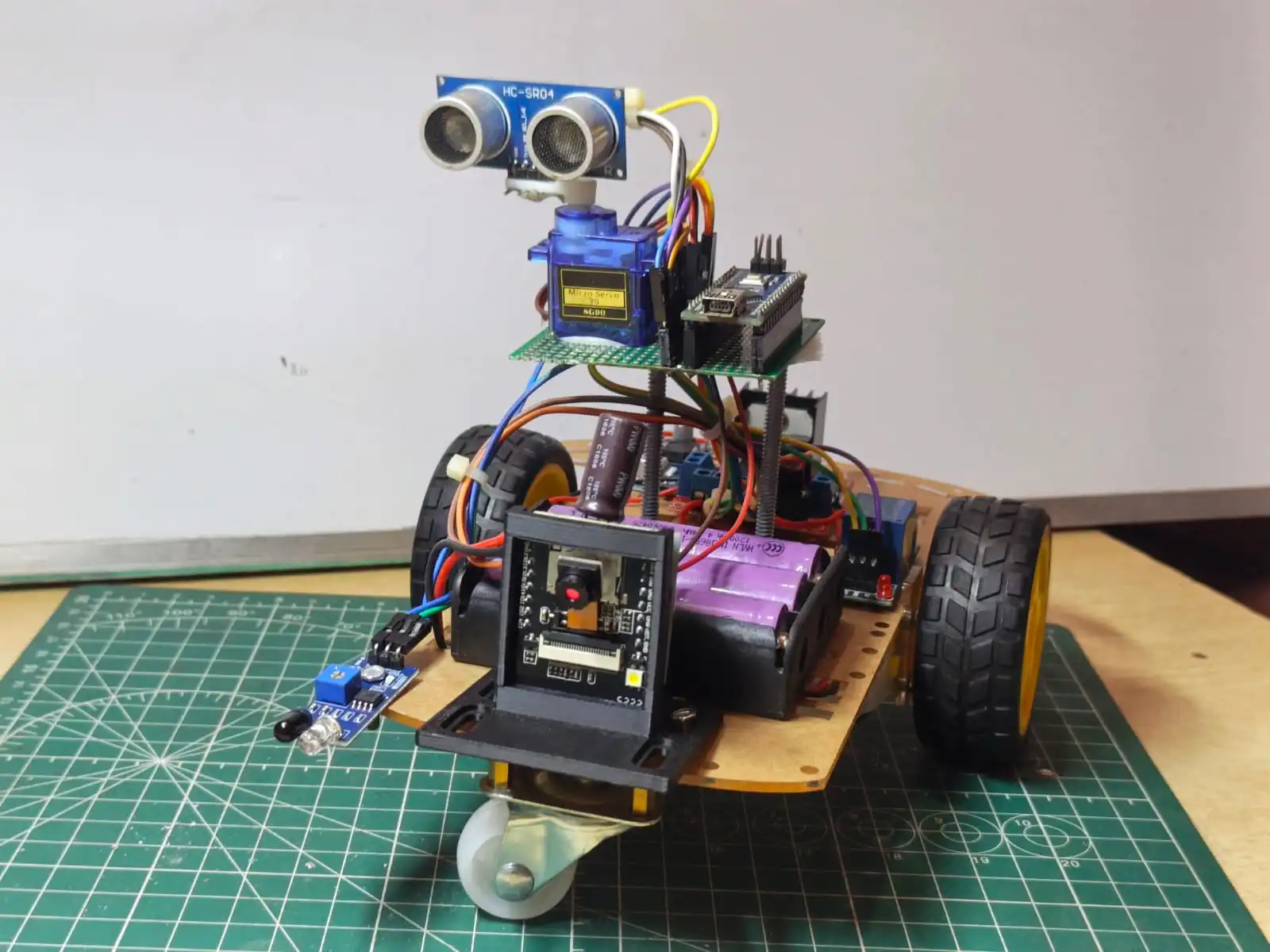
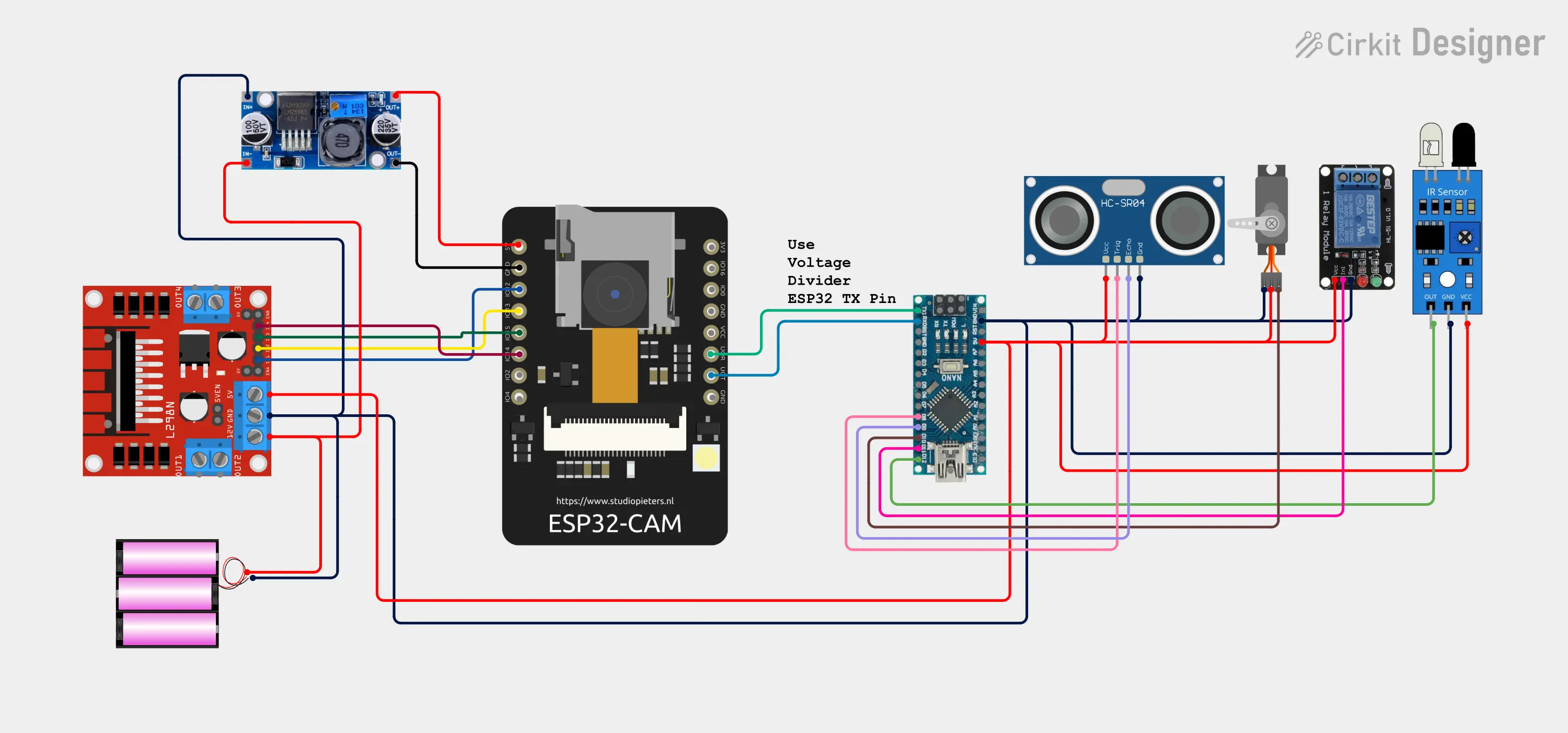
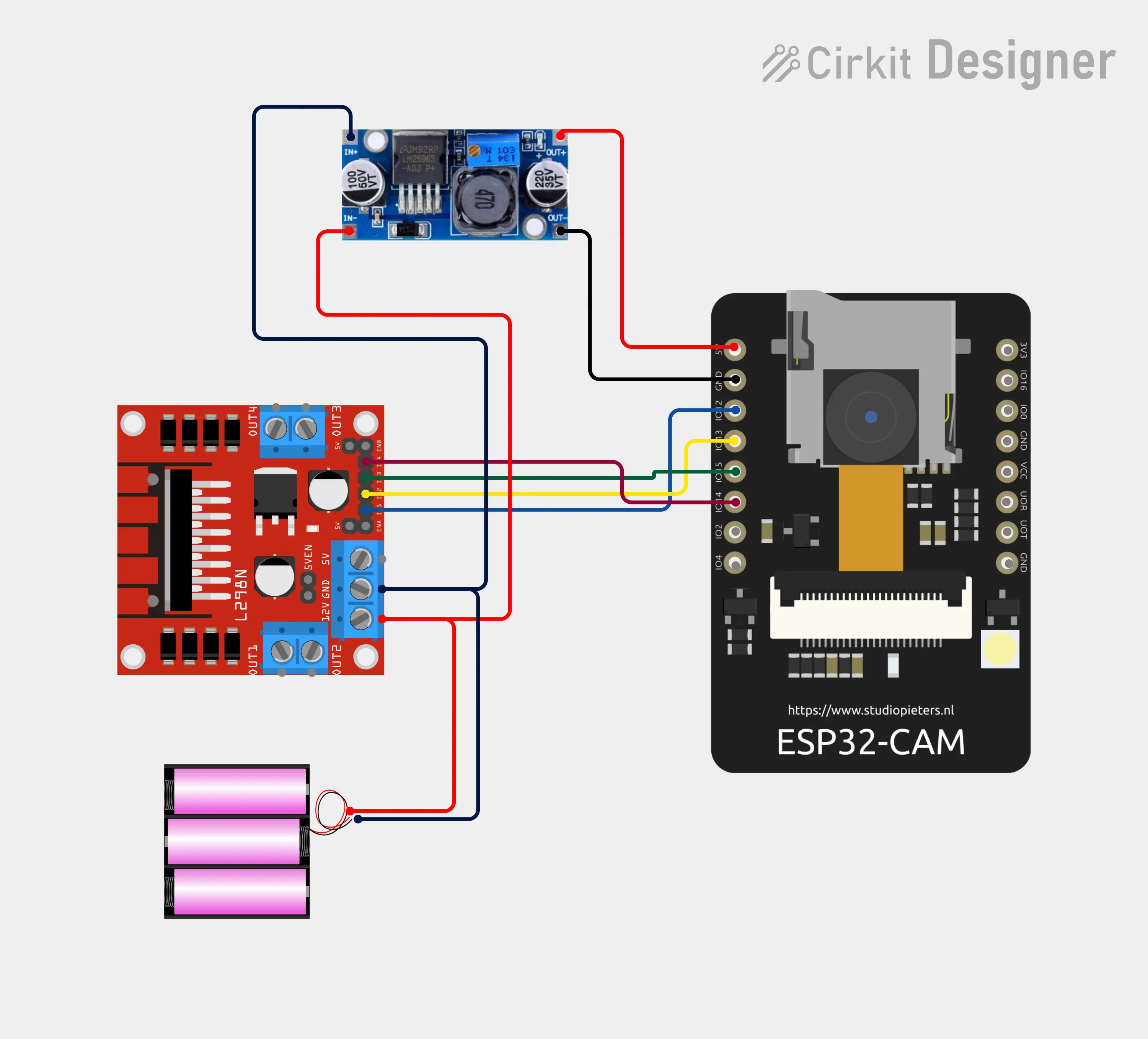
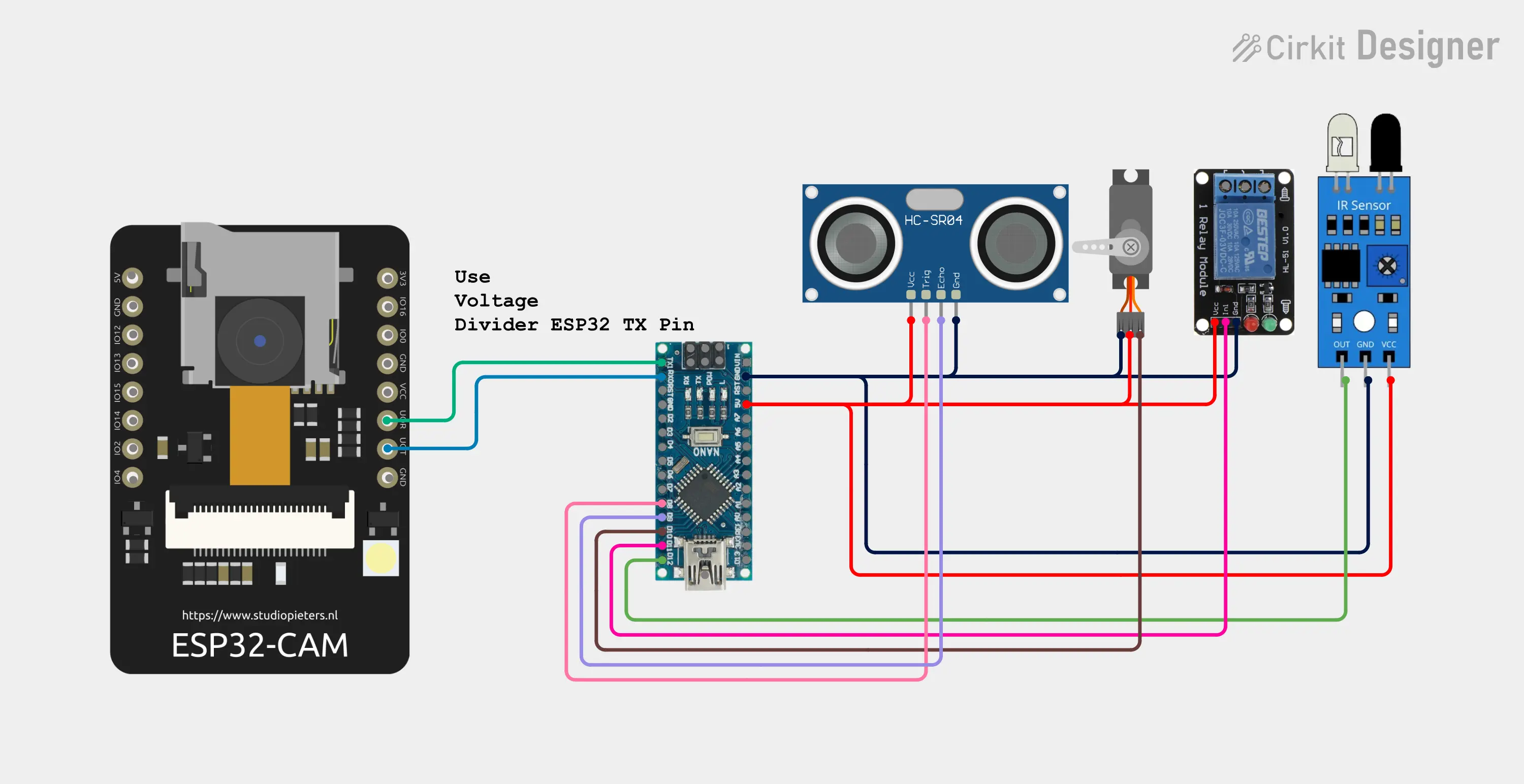
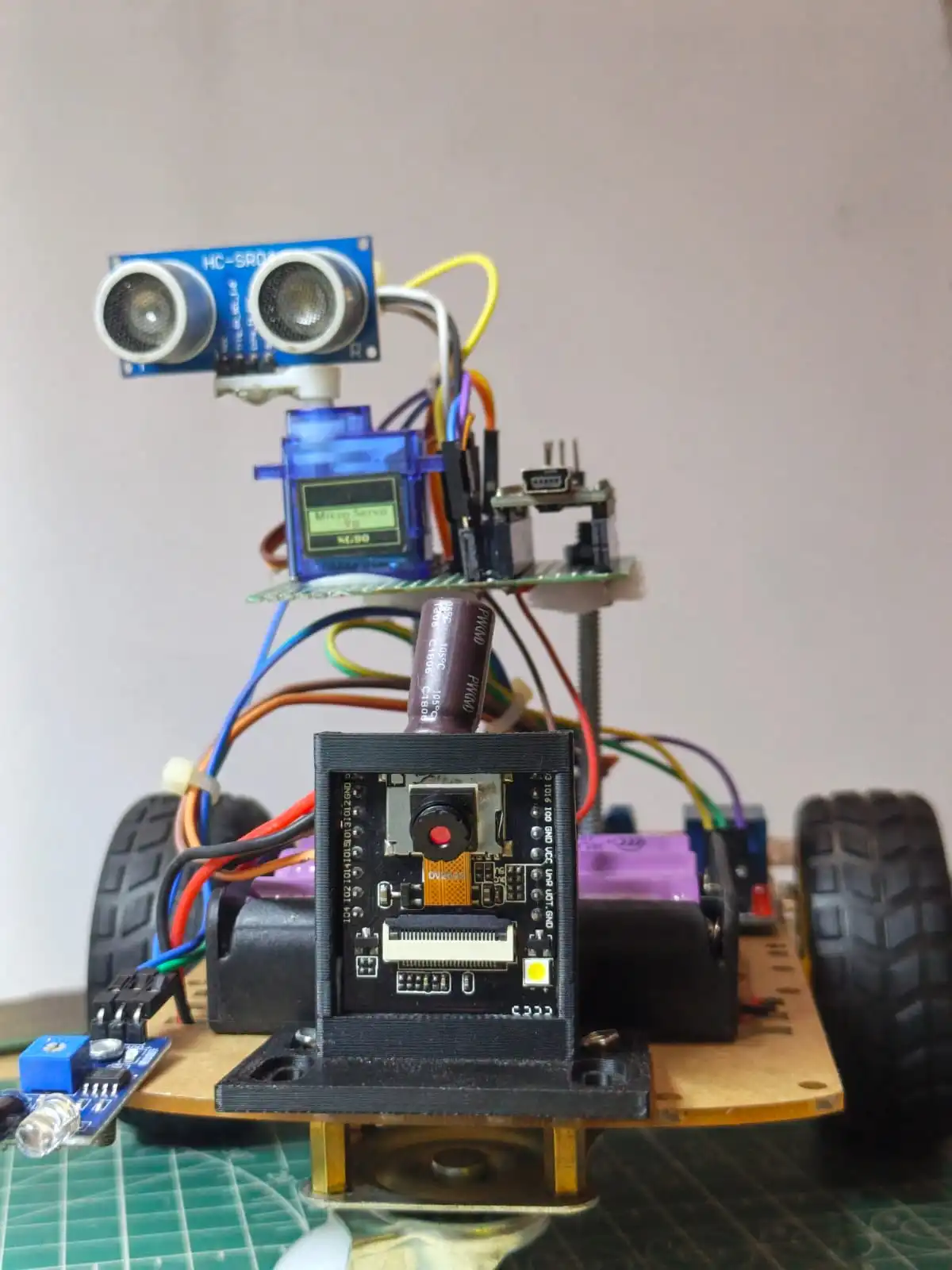
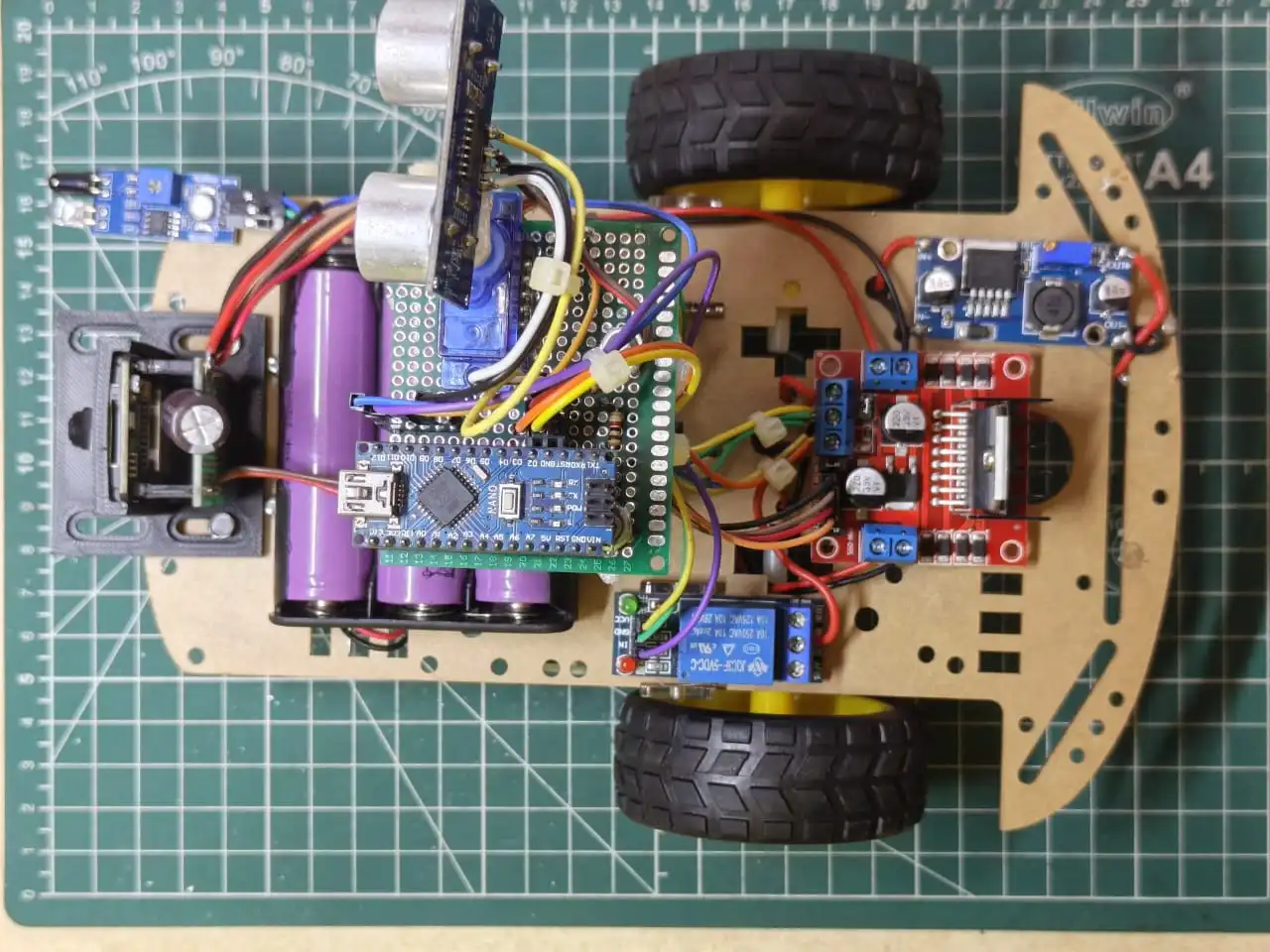
Table of Contents
- Project Overview
- Project Features
- Live Video Streaming
- Wireless Robot Car Control
- Real-Time Radar System
- Obstacle Detection and Avoidance
- Remote Relay Control
- Camera Flash LED
- WiFi Configuration Portal
- Automatic Safety System
- Required Components
- System Architecture
- ESP32-CAM Pin Configuration
- Camera Pin Configuration
- ESP32-CAM and Arduino Nano Communication
- Working Principle
- Radar System and Visualization
- Obstacle Detection and Safety Mechanism
- WiFi Setup and Configuration
- Web-Based Control Interface
- Camera Configuration
- Arduino IDE Programming
- Power Supply Considerations
- Applications
- Advantages
- Limitations
- Troubleshooting
- Project Conclusion
Project Overview
The ESP32-CAM WiFi Spy Car is an advanced wireless robotic vehicle designed for remote monitoring, live video surveillance, and obstacle detection. This project combines an AI Thinker ESP32-CAM module with an Arduino Nano to create a smart robotic car that can be controlled remotely using a smartphone or computer through a web browser.
Unlike traditional Bluetooth-controlled robot cars, this system uses WiFi communication to provide live MJPEG video streaming, wireless motor control, real-time radar visualization, obstacle detection, and remote relay switching.
The ESP32-CAM works as the main controller for wireless communication, camera streaming, and motor control, while the Arduino Nano handles the radar system, ultrasonic distance measurement, IR obstacle detection, and relay control.
The system also includes a WiFi configuration portal, allowing users to connect the car to a WiFi router without modifying the program.
Project Highlights:
- Wireless control through a web browser.
- Live camera video streaming.
- Real-time radar visualization.
- Ultrasonic and IR obstacle detection.
- Automatic forward movement protection.
- Remote relay ON/OFF control.
- Built-in camera flash LED.
- WiFi hotspot configuration system.
- Automatic WiFi reconnection.
Project Features
Live Video Streaming
The ESP32-CAM captures live video and transmits it to a smartphone or computer using MJPEG streaming over WiFi.
Users can view the surrounding environment directly from the vehicle's camera through a web browser.
Wireless Robot Car Control
The vehicle can move in four directions using an interactive web-based controller.
- Forward
- Backward
- Left
- Right
- Stop
The control interface uses touch-friendly buttons, making it convenient to operate from a smartphone.
Real-Time Radar System
The Arduino Nano manages a scanning radar system that detects objects in front of the vehicle.
The radar scans from 0° to 180° with a 5° step interval, producing 37 measurement positions.
Radar measurements are transmitted to the ESP32-CAM and displayed as a graphical radar overlay on the live camera interface.
Obstacle Detection and Avoidance
The project uses two types of obstacle detection sensors:
- Ultrasonic sensor for measuring object distance.
- IR sensor for detecting nearby obstacles.
When an obstacle is detected, the ESP32-CAM blocks forward movement and stops the motors if the vehicle is already moving forward.
Remote Relay Control
An external relay module connected to the Arduino Nano can be controlled remotely through the web interface.
Users can switch the relay ON or OFF without physically accessing the vehicle.
Camera Flash LED
The built-in ESP32-CAM flash LED (GPIO4) can be switched ON or OFF remotely.
It provides additional illumination when operating in low-light environments.
WiFi Configuration Portal
The system creates its own WiFi hotspot named SpyCar.
Users can connect to this hotspot and configure their router WiFi credentials using a web-based setup page.
After successful connection, the system displays its assigned IP address and device URL.
Automatic Safety System
Several safety mechanisms are included:
- Motor stop when control commands are interrupted.
- Forward movement blocked when the Arduino Nano becomes disconnected.
- Forward movement blocked when an obstacle is detected.
- Automatic motor shutdown after 800 milliseconds without a valid movement command.
Required Components
The following components are required to build this project.
| No. | Component Name | Quantity |
|---|---|---|
| 1 | ESP32-CAM AI Thinker Module | 1 |
| 2 | OV2640 Camera Module | 1 |
| 3 | Arduino Nano | 1 |
| 4 | L298N Motor Driver Module | 1 |
| 5 | 2WD Robot Car Chassis | 1 |
| 6 | DC Gear Motors | 2 |
| 7 | Robot Wheels | 2 |
| 8 | Caster Wheel | 1 |
| 9 | HC-SR04 Ultrasonic Sensor | 1 |
| 10 | SG90 Servo Motor | 1 |
| 11 | IR Obstacle Detection Sensor | 1 |
| 12 | 5V Relay Module | 1 |
| 13 | Battery Pack | 1 |
| 14 | DC-DC Buck Converter | 1 |
| 15 | Jumper Wires | As Required |
| 16 | Power Switch | 1 |
| 17 | Capacitors | As Required |
Note: The component list includes the typical hardware needed for this type of build. The supplied ESP32-CAM firmware confirms the controller, motor driver, radar data, ultrasonic/IR sensing and relay functions, but the exact Nano-side sensor wiring and component models must be matched with the Arduino Nano program.
System Architecture
The project is divided into two main controller sections.
Main Controller – ESP32-CAM
The ESP32-CAM manages:
- WiFi communication.
- Live camera streaming.
- Web-based control interface.
- Motor driver control.
- Flash LED control.
- Radar data visualization.
- Communication with Arduino Nano.
- WiFi configuration and reconnection.
Secondary Controller – Arduino Nano
The Arduino Nano manages:
- Radar scanning.
- Ultrasonic distance measurement.
- IR obstacle detection.
- Relay switching.
- Radar measurement transmission.
- Sensor status communication.
Both controllers communicate through a hardware UART serial connection.
ESP32-CAM Pin Configuration
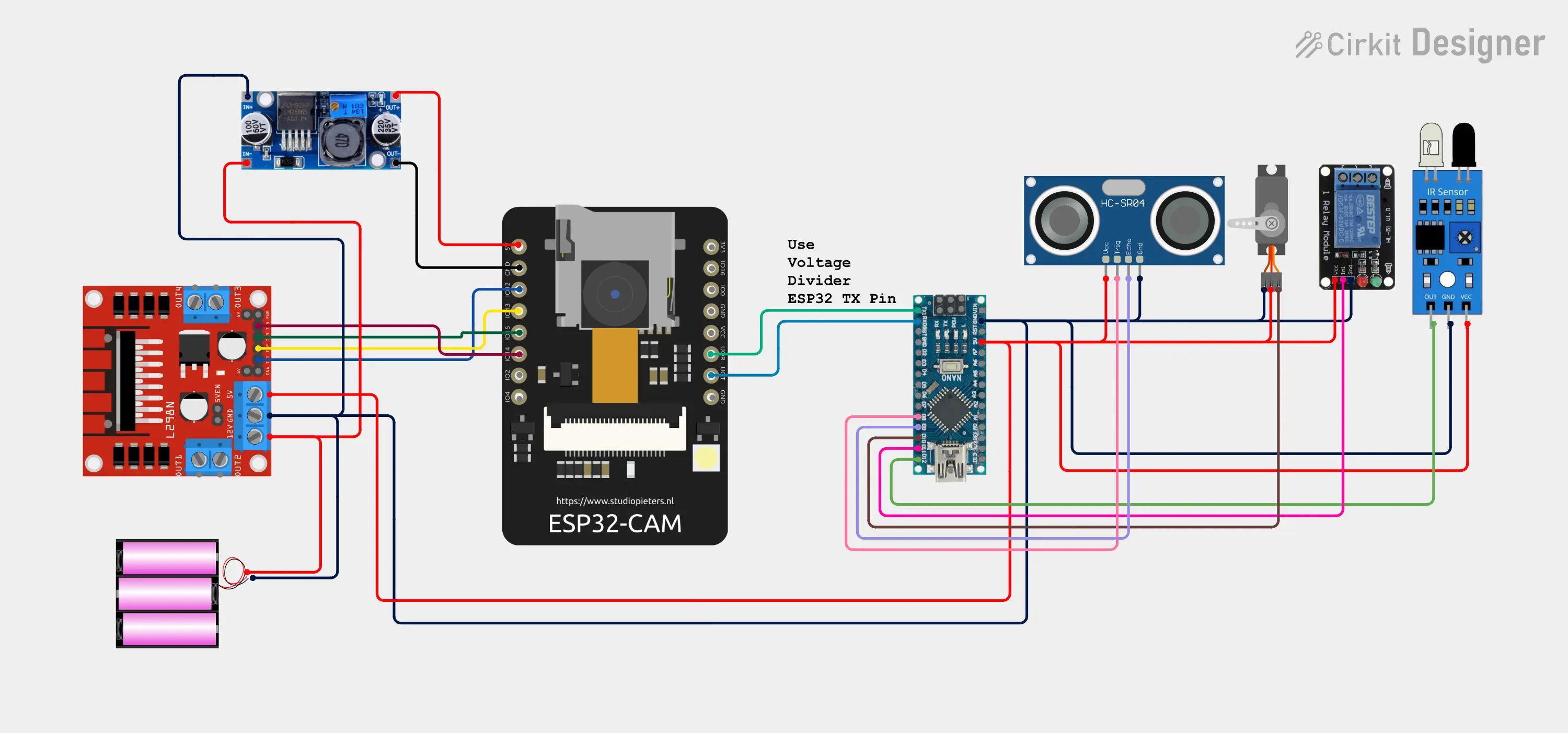
The following pin configuration is used in the supplied ESP32-CAM program.
| ESP32-CAM GPIO | Connection | Function |
|---|---|---|
| GPIO 12 | L298N IN1 | Left Motor Control |
| GPIO 13 | L298N IN2 | Left Motor Control |
| GPIO 15 | L298N IN3 | Right Motor Control |
| GPIO 14 | L298N IN4 | Right Motor Control |
| GPIO 4 | Built-in Flash LED | LED Control |
| GPIO 1 (U0T) | Arduino Nano RX0 | UART Transmit |
| GPIO 3 (U0R) | Arduino Nano TX1 via divider | UART Receive |
Important: The AI Thinker ESP32-CAM uses several GPIO pins internally for its camera. The above motor and UART pin assignments must be maintained according to the supplied firmware.
Camera Pin Configuration
The AI Thinker ESP32-CAM uses the following camera pin mapping.
| Camera Signal | ESP32 GPIO |
|---|---|
| PWDN | GPIO 32 |
| RESET | Not Connected |
| XCLK | GPIO 0 |
| SIOD | GPIO 26 |
| SIOC | GPIO 27 |
| Y9 | GPIO 35 |
| Y8 | GPIO 34 |
| Y7 | GPIO 39 |
| Y6 | GPIO 36 |
| Y5 | GPIO 21 |
| Y4 | GPIO 19 |
| Y3 | GPIO 18 |
| Y2 | GPIO 5 |
| VSYNC | GPIO 25 |
| HREF | GPIO 23 |
| PCLK | GPIO 22 |
These connections are handled internally by the ESP32-CAM camera interface.
ESP32-CAM and Arduino Nano Communication
The ESP32-CAM and Arduino Nano communicate through UART0 at 9600 baud.
| ESP32-CAM | Arduino Nano |
|---|---|
| GPIO 1 (U0T) | RX0 |
| GPIO 3 (U0R) | TX1 through voltage divider |
| GND | GND |
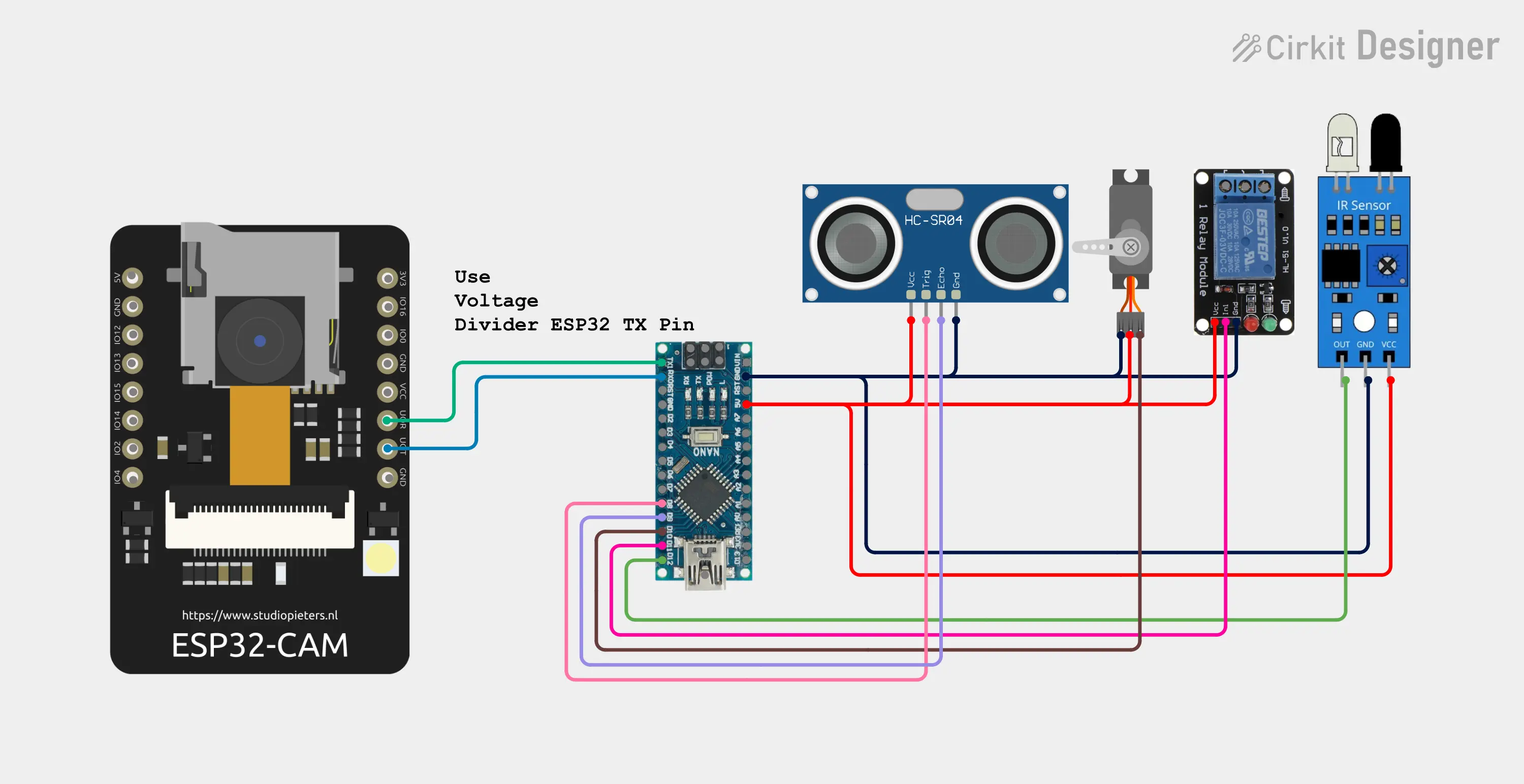
UART Voltage Divider:
The Arduino Nano operates with 5V logic, while ESP32-CAM GPIO operates at 3.3V logic.
Therefore, a voltage divider is required on the Nano TX to ESP32 RX connection.
Use:
- 1KΩ resistor.
- 2KΩ resistor.
Connect the Nano TX signal through the 1KΩ resistor to ESP32 GPIO3, and connect a 2KΩ resistor from GPIO3 to GND.
Connect both controller grounds together.
Important Programming Note: UART0 is used for communication with the Arduino Nano. Disconnect the two UART wires during ESP32-CAM programming to avoid upload conflicts. The normal Serial Monitor debugging output is also unavailable because UART0 is dedicated to the Nano connection.
Working Principle
The complete system operates through the following process.
Step 1: System Startup
When the vehicle is powered ON, the ESP32-CAM initializes its camera, motor control pins, and communication system.
The Arduino Nano starts handling the connected sensors and radar system.
Step 2: WiFi Connection
The ESP32-CAM checks whether previously saved WiFi credentials are available.
If the router is available, it connects automatically. Otherwise, it activates the SpyCar setup hotspot.
Step 3: Accessing the Control Interface
The user connects a smartphone to the vehicle's WiFi network and opens the web interface.
The interface provides live video, movement controls, radar information, relay control, and camera flash control.
Step 4: Live Camera Streaming
The ESP32-CAM continuously captures camera frames and sends them to the browser using MJPEG streaming.
The stream runs on a separate HTTP server port (81), keeping video streaming separate from the main control server.
Step 5: Radar Scanning
The Arduino Nano operates the radar scanning mechanism.
It measures object distances at different angles and sends the readings to the ESP32-CAM.
The ESP32-CAM displays these measurements on the radar interface.
Step 6: Obstacle Detection
The ultrasonic and IR sensors continuously monitor the front area.
If an obstacle is detected, forward movement is blocked automatically.
Step 7: Motor Control
When a user presses a movement button, the ESP32-CAM sends the appropriate signals to the L298N motor driver.
When the user releases the button, the vehicle receives a stop command.
Step 8: Safety Monitoring
The controller continuously monitors communication and movement commands.
If movement commands stop arriving for more than 800 milliseconds, the motors automatically stop.
If communication with the Arduino Nano is lost for more than 1.5 seconds, forward movement is blocked.
Radar System and Visualization
The radar system is one of the most interesting features of this project.
It uses a scanning mechanism to measure the distance of objects across a 180-degree area.
Radar Specifications
| Parameter | Value |
|---|---|
| Scanning Range | 0°–180° |
| Scanning Step | 5° |
| Measurement Positions | 37 |
| Maximum Display Range | 200 cm |
| Data Update Interval | 200 ms |
| Controller | Arduino Nano |
| Display | Web-Based Radar Canvas |
The radar display uses different colors to represent object distances:
- Red: Objects closer than 30 cm.
- Orange: Objects between 30 cm and 80 cm.
- Green: Objects farther than 80 cm.
The nearest detected object and its approximate direction are also displayed.
Obstacle Detection and Safety Mechanism
The project combines ultrasonic and IR sensors to improve obstacle detection.
Ultrasonic Sensor
The ultrasonic sensor measures the distance between the vehicle and an object in front of it.
The measured distance is transmitted to the ESP32-CAM.
IR Obstacle Sensor
The IR sensor detects nearby obstacles using infrared reflection.
Automatic Forward Protection
The firmware includes a forward movement protection mechanism.
The vehicle will not move forward when:
- The Arduino Nano is disconnected.
- An obstacle is detected by the Nano.
- The Nano has not sent valid data within the configured timeout.
If an obstacle appears while the vehicle is moving forward, the controller automatically stops the motors.
Note: The current firmware implements forward blocking and stopping. It does not automatically calculate a new route or turn around an obstacle.
WiFi Setup and Configuration
The project includes a built-in WiFi configuration system.
Users do not need to edit the source code whenever the WiFi network changes.
Default WiFi Hotspot
| Setting | Value |
|---|---|
| WiFi Name | SpyCar |
| Password | 12345678 |
| Setup IP | 192.168.4.1 |
| Device URL | http://spycar.local |
| WiFi Band | 2.4GHz |
Configuration Steps
- Power ON the Spy Car.
- Open the WiFi settings on your smartphone.
- Connect to
SpyCar. - Enter the password
12345678. - Open a browser.
- Visit
http://192.168.4.1. - Scan for available WiFi networks.
- Select your router WiFi.
- Enter the WiFi password.
- Press Connect.
After successfully connecting to the router, the setup page displays the assigned IP address and device URL.
Connect your smartphone to the same router network and open the displayed IP address or http://spycar.local.
The controller also includes a WiFi Reset button for clearing saved WiFi credentials and restarting the setup process.
Note: The setup hotspot is designed to remain active temporarily after a successful connection and can also be switched off through the setup interface.
Web-Based Control Interface
The project provides a custom-designed web interface that works on smartphones, tablets, and computers.
The interface includes:
| Control | Function |
|---|---|
| Forward Button | Move forward |
| Backward Button | Move backward |
| Left Button | Turn left |
| Right Button | Turn right |
| Stop Button | Stop the vehicle |
| Capture Button | Capture a photograph |
| Light Button | Control camera flash LED |
| Relay Button | Switch external relay |
| WiFi Reset | Reset WiFi configuration |
The interface also displays:
- Live camera feed.
- Radar scanning visualization.
- Front obstacle distance.
- Nearest detected object.
- Current movement direction.
- IR sensor status.
- Arduino Nano communication status.
- WiFi connection status.
- Device IP address and URL.
Camera Configuration
The firmware supports three camera quality presets.
| Preset | Resolution | Approximate Frame Rate | Description |
|---|---|---|---|
| 1 | 160 × 120 | 14 FPS | Lightweight |
| 2 | 320 × 240 | 11 FPS | Recommended |
| 3 | 640 × 480 | 7 FPS | Higher resolution |
The current firmware uses:
VIDEO_PRESET 1
To select a different quality, change the preset value in the source code.
For example:
#define VIDEO_PRESET 2
This selects QVGA resolution (320 × 240), which provides a balance between image quality and streaming performance.
Actual frame rate depends on WiFi signal quality, camera performance, and available memory.
Arduino IDE Programming
The project uses Arduino IDE for programming both controllers.
Required Software
- Arduino IDE.
- ESP32 Board Package.
- ESP32-CAM camera support.
- Arduino Nano board support.
ESP32-CAM Programming
- Open Arduino IDE.
- Install the ESP32 board package.
- Select AI Thinker ESP32-CAM from the board menu.
- Connect the ESP32-CAM using an FTDI programmer.
- Disconnect the UART wires connected to the Arduino Nano.
- Upload the ESP32-CAM firmware.
- Reconnect the Nano communication wires after uploading.
Arduino Nano Programming
The Arduino Nano requires its own firmware to manage the radar, ultrasonic sensor, IR sensor, and relay.
The supplied ESP32-CAM firmware expects the following serial message formats from the Nano:
S,<obstacle>,<distance>,<ir>,<relay>,<radar>
R,<angle>,<distance>
The Nano should also receive these commands:
RL,1
RL,0
RD,1
RD,0
Where:
RL,1– Relay ON.RL,0– Relay OFF.RD,1– Radar ON.RD,0– Radar OFF.
Both controllers must use 9600 baud for communication.
Important: The ESP32-CAM firmware is the main controller program. A matching Arduino Nano firmware is also necessary for the complete project. The Nano source code and its exact sensor pin assignments are not included in the supplied file.
Power Supply Considerations
A stable power supply is essential for reliable operation.
The ESP32-CAM, camera, WiFi transmitter, Arduino Nano, motors, and sensors should receive appropriate regulated power.
Recommended considerations:
- Use a suitable battery pack for the motor system.
- Provide a stable regulated supply for the ESP32-CAM.
- Supply the Arduino Nano according to its operating requirements.
- Ensure the L298N motor supply matches the DC motors.
- Connect all controller and driver grounds together.
- Use suitable capacitors near the power supply to reduce voltage fluctuations.
- Avoid powering the motors directly from the ESP32-CAM.
Important: The exact battery voltage, regulator current rating, and wiring depend on the selected motors and hardware. Verify the power requirements before connecting the circuit.
Applications
This project can be used for several educational and experimental purposes.
- WiFi-controlled robotic vehicles.
- Remote environmental monitoring.
- Wireless camera surveillance experiments.
- Robotics and automation learning.
- Obstacle detection experiments.
- Radar visualization demonstrations.
- IoT-based robotic control.
- Embedded systems development.
- Arduino and ESP32 learning projects.
- STEM and engineering education.
Advantages
- Wireless operation without Bluetooth range limitations.
- Live camera monitoring.
- Smartphone and computer compatibility.
- Real-time radar visualization.
- Multiple obstacle detection methods.
- Automatic forward movement protection.
- Remote relay switching.
- Configurable WiFi connection.
- Custom web-based control interface.
- Separate video and control servers.
Limitations
Although the project provides several advanced features, there are some limitations to consider.
- The system depends on WiFi connectivity.
- Video streaming performance depends on network quality.
- The current radar display is limited to a 200 cm visualization range.
- The radar and sensor system depends on Arduino Nano communication.
- Forward obstacle protection does not provide autonomous route planning.
- The current firmware does not implement GPS tracking.
- The system does not provide internet-based remote access by default.
- The camera resolution and frame rate depend on the selected preset and hardware.
Troubleshooting
| Problem | Possible Solution |
|---|---|
| ESP32-CAM not powering ON | Check the power supply and connections |
| Camera initialization failed | Check the camera ribbon cable |
| Cannot connect to SpyCar | Check hotspot and password |
| WiFi connection failed | Verify SSID and password; use 2.4GHz WiFi |
| Video streaming not working | Check WiFi signal and port 81 connectivity |
| Motors not moving | Check L298N wiring and motor power |
| Forward movement blocked | Check Nano connection and obstacle sensors |
| Radar not displaying | Check Nano UART communication |
| Relay not responding | Check Nano firmware and relay connections |
| ESP32-CAM upload failed | Disconnect UART0 wires during programming |
Project Conclusion
The ESP32-CAM WiFi Spy Car is a multifunctional robotics project that combines wireless communication, live video streaming, radar visualization, obstacle detection, and remote motor control into a single embedded system.
By combining the processing capabilities of the ESP32-CAM and Arduino Nano, the project demonstrates how multiple microcontrollers can work together to build a more advanced robotic platform.
It is an excellent practical project for students, electronics enthusiasts, and robotics developers who want to explore ESP32, Arduino, IoT, wireless communication, and embedded system development.
The modular design also provides opportunities for future improvements, including GPS integration, autonomous navigation, mobile application control, and advanced obstacle avoidance algorithms.
Build • Learn • Innovate — Micro Tronic
Source Code
ESP32CAM.inoDownload
/*
  ESP32-CAM Spy Car v2 - MAIN BOARD (WiFi + Camera + Motor Driver + Flash LED)
  + Arduino Nano link (Relay, Radar, Ultrasonic, IR sensor Nano te ache)

  v2 FIX:
  - Radar shudhu button chaple ON hobe (scan korbe), default OFF
  - Radar data/HUD camera video er upore overlay (radar ON thakle radar, sob somoy HUD reading)
  - Web server jam hoy na: radar poll e in-flight guard, halka JSON (String use kora hoyni)
  - Motor failsafe 1000ms + heartbeat 200ms (deri hole o motor bondho hobe na)
  - Nano status race fix (button chaple ager status ulte dey na)
  - UART RX buffer 1024 byte
  - Flash LED: OFF / ON / BLINK (Light button chaple ghure ghure)
  - Pichoner lal LED (GPIO33) = loop alive indicator. Blink korle code cholche, blink bondho = hang
  - WiFi TX power kom kora (brownout kom hobe)

  Nano link (hardware UART, 9600 baud):
    ESP32 U0T (GPIO1) --------------------> Nano RX0
    ESP32 U0R (GPIO3) <--[1k]--+--[2k]--GND  Nano TX1   (voltage divider, 5V -> 3.3V)
    GND ---- GND
  NOTE: UART0 Nano er sathe use hocche, tai Serial Monitor/debug kaj korbe na.
        ESP32 code upload korar somoy U0T/U0R er wire duita khule rakho.

  Board : AI Thinker ESP32-CAM  (Arduino IDE: "AI Thinker ESP32-CAM")

  Kibhabe use korbe:
  1) Power on korar por phone er WiFi e "SpyCar" khojo, password: 12345678
  2) Connect hoye browser e kholo: http://192.168.4.1
  3) Router WiFi select/likho + password dao -> Connect
  4) Page e IP ar URL dekhabe. Phone ke router WiFi te connect kore oi IP/URL kholo
  5) WiFi bodlate chaile controller page er "WiFi Reset" button chaapo
  (Mobile data off rakho)
*/

#include "esp_camera.h"
#include "esp_http_server.h"
#include "esp_timer.h"
#include <WiFi.h>
#include <ESPmDNS.h>
#include <Preferences.h>
#include "soc/soc.h"
#include "soc/rtc_cntl_reg.h"

// UART0 (GPIO1/GPIO3) Nano er sathe link hishebe use hocche.
// Tai debug "Serial" ke dummy kore dewa hoyeche (Serial.print/println kono kaj korbe na).
static HardwareSerial& NanoLink = Serial;
struct NullSerial {
  void begin(unsigned long) {}
  template <typename T> size_t print(T) { return 0; }
  template <typename T> size_t println(T) { return 0; }
  size_t println() { return 0; }
  int printf(const char*, ...) { return 0; }
};
static NullSerial SerialNull;
#define Serial SerialNull

// ================== FIX SWITCHES ==================
// 1 = brownout reset bondho (shudhu temporary test er jonno; asol fix hocche power/capacitor)
#define DISABLE_BROWNOUT 0

// Nano na pele car forward e jabe kina (1 = jabe na, safer)
#define BLOCK_FWD_IF_NANO_LOST 1
#define NANO_TIMEOUT_MS 1500

// Command na ashle koto ms por motor stop (web heartbeat 200ms)
#define MOTOR_FAILSAFE_MS 1000

// WiFi TX power: kom korle current peak kome, brownout kome (range ektu kome)
#define WIFI_TX_POWER WIFI_POWER_15dBm

// ================== WIFI SETTINGS ==================
// Setup hotspot (WiFi set korar jonno)
const char* AP_SSID = "SpyCar";
const char* AP_PASS = "12345678";

// mDNS hostname: http://spycar.local
const char* MDNS_NAME = "spycar";

const unsigned long WIFI_BOOT_TIMEOUT_MS  = 20000;   // boot e saved WiFi te connect howar somoy
const unsigned long CONNECT_TIMEOUT_MS    = 20000;   // setup page theke connect howar somoy
const unsigned long AP_KEEP_MS            = 300000;  // WiFi connect hower por hotspot koto khon cholbe (5 min)
const unsigned long WIFI_LOST_TO_AP_MS    = 60000;   // router haraye 60s por abar hotspot on
const unsigned long AP_RETRY_MS           = 60000;   // hotspot on thakle saved WiFi te abar try

// ================== PINS ==================
#define IN1 12   // Left motor
#define IN2 13
#define IN3 15   // Right motor
#define IN4 14
#define FLASH_LED  4    // shada boro flash LED
#define STATUS_LED 33   // pichoner choto lal LED (active LOW)

// ---- Nano UART link (UART0) ----
// ESP32 U0T (GPIO1) -> Nano RX0 ;  Nano TX1 -> divider -> ESP32 U0R (GPIO3)
#define NANO_BAUD   9600

// ================== CAMERA PINS (AI Thinker) ==================
#define PWDN_GPIO_NUM     32
#define RESET_GPIO_NUM    -1
#define XCLK_GPIO_NUM      0
#define SIOD_GPIO_NUM     26
#define SIOC_GPIO_NUM     27
#define Y9_GPIO_NUM       35
#define Y8_GPIO_NUM       34
#define Y7_GPIO_NUM       39
#define Y6_GPIO_NUM       36
#define Y5_GPIO_NUM       21
#define Y4_GPIO_NUM       19
#define Y3_GPIO_NUM       18
#define Y2_GPIO_NUM        5
#define VSYNC_GPIO_NUM    25
#define HREF_GPIO_NUM     23
#define PCLK_GPIO_NUM     22

// ================== STATE ==================
enum Dir { D_STOP, D_FORWARD, D_BACK, D_LEFT, D_RIGHT };
volatile Dir currentDir = D_STOP;
volatile unsigned long lastCmdTime = 0;
volatile uint8_t flashMode = 0;         // 0 = off, 1 = on, 2 = blink

// ---- Nano theke ashe ----
#define RADAR_STEP   5
#define RADAR_POINTS 37                 // 0..180 deg, 5 deg step
volatile bool nanoObstacle = false;     // IR ba ultrasonic samne obstacle dekhche
volatile int  nanoDist = 0;             // samner distance (cm), 0 = echo nai
volatile bool nanoIR = false;
volatile bool relayOn = false;
volatile bool radarOn = false;
volatile int  radarAngle = 90;
volatile unsigned long lastNanoMsg = 0; // 0 = kokhono Nano er signal pai nai
volatile unsigned long radarCmdAt = 0;  // button chapar somoy (Nano status race fix)
volatile unsigned long relayCmdAt = 0;
int16_t radarDist[RADAR_POINTS];        // 0 = echo nai / bahire

httpd_handle_t control_httpd = NULL;
httpd_handle_t stream_httpd  = NULL;

// ---- WiFi manager state ----
Preferences prefs;
String savedSsid = "";
String savedPass = "";

bool apActive = false;                 // setup hotspot on ache kina
bool mdnsStarted = false;

enum ConnState { CS_IDLE, CS_CONNECTING, CS_OK, CS_FAIL };
volatile ConnState connState = CS_IDLE;
volatile bool connectRequested = false;
String reqSsid = "";
String reqPass = "";
unsigned long connStart = 0;

volatile unsigned long apOffAt = 0;    // 0 = hotspot off schedule nei
volatile unsigned long restartAt = 0;  // 0 = restart schedule nei

#define PART_BOUNDARY "123456789000000000000987654321"

// ================= VIDEO QUALITY PRESET =================
// 1 = QQVGA 160x120 (sobcheye halka, quality kom)
// 2 = QVGA  320x240 (RECOMMENDED: quality valo + smooth)
// 3 = VGA   640x480 (sobcheye valo quality, kintu strong router WiFi lagbe, lag hote pare)
#define VIDEO_PRESET 1

#if VIDEO_PRESET == 1
  #define CAM_FRAME_SIZE         FRAMESIZE_QQVGA
  #define CAM_JPEG_QUALITY       20      // jototuku choto number, toto valo quality
  #define STREAM_MIN_INTERVAL_MS 70      // ~14 FPS
  #define STREAM_MAX_FRAME_BYTES 16000
#elif VIDEO_PRESET == 2
  #define CAM_FRAME_SIZE         FRAMESIZE_QVGA
  #define CAM_JPEG_QUALITY       12
  #define STREAM_MIN_INTERVAL_MS 90      // ~11 FPS
  #define STREAM_MAX_FRAME_BYTES 30000
#else
  #define CAM_FRAME_SIZE         FRAMESIZE_VGA
  #define CAM_JPEG_QUALITY       12
  #define STREAM_MIN_INTERVAL_MS 140     // ~7 FPS
  #define STREAM_MAX_FRAME_BYTES 70000
#endif
static const char* STREAM_CONTENT_TYPE = "multipart/x-mixed-replace;boundary=" PART_BOUNDARY;
static const char* STREAM_BOUNDARY     = "\r\n--" PART_BOUNDARY "\r\n";
static const char* STREAM_PART         = "Content-Type: image/jpeg\r\nContent-Length: %u\r\n\r\n";

// ================== CONTROL PAGE ==================
static const char INDEX_HTML[] PROGMEM = R"rawliteral(
<!DOCTYPE html>
<html>
<head>
<meta charset="UTF-8">
<meta name="viewport" content="width=device-width, initial-scale=1, user-scalable=no">
<title>Spy Car</title>
<style>
  *{box-sizing:border-box;-webkit-user-select:none;user-select:none;-webkit-touch-callout:none}
  body{margin:0;background:#0b0f14;color:#e6edf3;font-family:Arial,sans-serif;text-align:center}
  h2{margin:10px 0 6px;font-size:20px}
  #view{display:flex;flex-wrap:wrap;gap:8px;justify-content:center;max-width:1100px;margin:auto;padding:0 6px}
  #wrap{position:relative;flex:1 1 320px;max-width:640px;margin:0}
  #video{width:100%;display:block;background:#000;border-radius:8px}
  #warn{display:none;position:absolute;top:8px;left:50%;transform:translateX(-50%);
        background:#d62828;color:#fff;padding:6px 14px;border-radius:20px;font-weight:bold;font-size:14px}
  .pad{display:grid;grid-template-columns:repeat(3,84px);grid-gap:10px;justify-content:center;margin:16px 0}
  .btn{height:84px;border:none;border-radius:16px;background:#1f6feb;color:#fff;font-size:30px;touch-action:none}
  .btn:active{background:#388bfd}
  .stop{background:#d62828}
  .empty{visibility:hidden}
  .row{display:flex;gap:10px;justify-content:center;margin:8px;flex-wrap:wrap}
  .act{padding:12px 20px;border:none;border-radius:10px;background:#2ea043;color:#fff;font-size:16px}
  .act.off{background:#555}
  #st{font-size:13px;color:#8b949e;margin-top:6px}
  #radar{display:none;position:absolute;right:6px;bottom:6px;width:48%;border-radius:8px;
         border:1px solid #1f6f3a;background:rgba(0,16,6,.45)}
  #hud{position:absolute;left:6px;top:6px;text-align:left;font-size:12px;line-height:1.5;
       background:rgba(0,0,0,.55);color:#3fb950;padding:5px 8px;border-radius:8px;
       font-family:monospace;pointer-events:none}
  #hud.bad{color:#ff5050}
</style>
</head>
<body>
<h2>🕵️ Spy Car</h2>
<div id="view">
  <div id="wrap">
    <img id="video" crossorigin="anonymous" alt="Live Video">
    <div id="hud">Connecting...</div>
    <canvas id="radar" width="320" height="176"></canvas>
    <div id="warn">⚠ OBSTACLE! Forward blocked</div>
  </div>
</div>

<div class="pad">
  <div class="empty"></div>
  <button class="btn" data-c="forward">▲</button>
  <div class="empty"></div>
  <button class="btn" data-c="left">◀</button>
  <button class="btn stop" data-c="stop">■</button>
  <button class="btn" data-c="right">▶</button>
  <div class="empty"></div>
  <button class="btn" data-c="back">▼</button>
  <div class="empty"></div>
</div>

<div class="row">
  <button class="act" onclick="capture()">📷 Capture</button>
  <button class="act off" id="ledBtn" onclick="toggleLed()">💡 Light: OFF</button>
  <button class="act off" id="relayBtn" onclick="toggleRelay()">🔌 Relay: OFF</button>
  <button class="act off" id="radarBtn" onclick="toggleRadar()">📡 Radar: OFF</button>
  <button class="act off" onclick="resetWifi()">📶 WiFi Reset</button>
</div>

<div id="st">Connecting...</div>
<div id="net" style="font-size:12px;color:#8b949e;margin:6px 0 12px;line-height:1.5">
  Network: Checking...<br>
  IP: Checking...
</div>

<script>
  const host = location.hostname;
  const video = document.getElementById('video');
  let streamRetry = null;

  function startVideo() {
    clearTimeout(streamRetry);
    video.src = 'http://' + host + ':81/stream?t=' + Date.now();
  }

  video.onerror = function() {
    clearTimeout(streamRetry);
    streamRetry = setTimeout(startVideo, 700);
  };

  startVideo();

  let timer = null;
  let busy = false;

  function send(c){
    // age er request shesh na hole notun pathabe na (stop ta shobsomoy jabe)
    if(busy && c !== 'stop') return;
    busy = true;
    fetch('/action?go=' + c, {keepalive:true})
      .catch(()=>{})
      .finally(()=>{ busy = false; });
  }

  function press(c){
    send(c);
    clearInterval(timer);
    timer = null;
    if(c !== 'stop') timer = setInterval(()=>send(c), 200);   // heartbeat
  }

  function release(){
    clearInterval(timer); timer = null;
    send('stop');
  }

  document.querySelectorAll('.btn').forEach(b=>{
    const c = b.dataset.c;
    b.addEventListener('pointerdown', e=>{ e.preventDefault(); press(c); });
    ['pointerup','pointerleave','pointercancel'].forEach(ev =>
      b.addEventListener(ev, e=>{ if(c!=='stop' && timer) release(); }));
  });

  function capture(){
    const a = document.createElement('a');
    a.href = '/capture?t=' + Date.now();
    a.download = 'spycar_' + Date.now() + '.jpg';
    document.body.appendChild(a); a.click(); a.remove();
  }

  // ---- Flash LED: OFF -> ON -> BLINK -> OFF ----
  let ledMode = 0;
  function toggleLed(){
    ledMode = (ledMode + 1) % 3;
    fetch('/led?on=' + ledMode).catch(()=>{});
    const b = document.getElementById('ledBtn');
    b.classList.toggle('off', ledMode === 0);
    b.innerText = '💡 Light: ' + ['OFF', 'ON', 'BLINK'][ledMode];
  }

  // ---- Relay (Nano) ----
  let relay = false;
  function setRelayUI(r, ok){
    relay = r;
    const b = document.getElementById('relayBtn');
    if (ok === false) { b.classList.add('off'); b.innerText = '🔌 Relay: N/A'; return; }
    b.classList.toggle('off', !r);
    b.innerText = '🔌 Relay: ' + (r ? 'ON' : 'OFF');
  }
  function toggleRelay(){
    fetch('/relay?on=' + (relay ? 0 : 1))
      .then(r=>r.json()).then(s=>setRelayUI(s.relay, s.nano)).catch(()=>{});
  }

  // ---- Radar (button chaple ON, video er upore overlay) ----
  const rc = document.getElementById('radar');
  const ctx = rc.getContext('2d');
  const hud = document.getElementById('hud');
  const RMAX = 200;       // cm
  let radarOn = false, radarBusy = false;
  let prevA = 90, sweepDir = 1;

  function setRadarUI(on, ok){
    const b = document.getElementById('radarBtn');
    if (ok === false) { on = false; b.classList.add('off'); b.innerText = '📡 Radar: N/A'; }
    else { b.classList.toggle('off', !on); b.innerText = '📡 Radar: ' + (on ? 'ON' : 'OFF'); }
    radarOn = on;
    rc.style.display = on ? 'block' : 'none';
  }
  function toggleRadar(){
    fetch('/radar?on=' + (radarOn ? 0 : 1))
      .then(r=>r.json()).then(s=>setRadarUI(s.radar, s.nano)).catch(()=>{});
  }

  function ptColor(v){ return v < 30 ? '#ff3030' : v < 80 ? '#ffb000' : '#3fb950'; }

  function drawRadar(x){
    const a = x.a, d = x.d;
    if (a !== prevA) { sweepDir = a > prevA ? 1 : -1; prevA = a; }
    const W = rc.width, H = rc.height, cx = W/2, cy = H - 6, R = H - 18;
    ctx.clearRect(0, 0, W, H);
    ctx.fillStyle = 'rgba(0,16,6,0.55)'; ctx.fillRect(0, 0, W, H);

    // grid
    ctx.lineWidth = 1; ctx.strokeStyle = '#1f6f3a'; ctx.fillStyle = '#3fb950'; ctx.font = '10px Arial';
    for (let i = 1; i <= 4; i++) {
      ctx.beginPath(); ctx.arc(cx, cy, R*i/4, Math.PI, 2*Math.PI); ctx.stroke();
      ctx.fillText((RMAX*i/4) + '', cx + 3, cy - R*i/4 + 10);
    }
    for (let g = 0; g <= 180; g += 30) {
      const t = g * Math.PI / 180;
      ctx.beginPath(); ctx.moveTo(cx, cy); ctx.lineTo(cx + R*Math.cos(t), cy - R*Math.sin(t)); ctx.stroke();
    }

    // sweep trail (fade hoye jay)
    for (let k = 0; k < 8; k++) {
      const t = (a - sweepDir * k * 3) * Math.PI / 180;
      ctx.strokeStyle = 'rgba(63,185,80,' + (0.55 - k*0.065) + ')'; ctx.lineWidth = 3;
      ctx.beginPath(); ctx.moveTo(cx, cy); ctx.lineTo(cx + R*Math.cos(t), cy - R*Math.sin(t)); ctx.stroke();
    }

    // objects (dure/kache rong alada) + nearest
    let near = 0, nearA = 0;
    d.forEach((v, i) => {
      if (v > 0 && v <= RMAX) {
        const ang = i * 5, t = ang * Math.PI / 180, r = R * v / RMAX;
        ctx.fillStyle = ptColor(v);
        ctx.beginPath(); ctx.arc(cx + r*Math.cos(t), cy - r*Math.sin(t), 3.5, 0, 6.3); ctx.fill();
        if (!near || v < near) { near = v; nearA = ang; }
      }
    });

    // front distance marker (90 deg)
    if (x.f > 0 && x.f <= RMAX) {
      const r = R * x.f / RMAX;
      ctx.strokeStyle = '#fff'; ctx.lineWidth = 2;
      ctx.beginPath(); ctx.arc(cx, cy - r, 4, 0, 6.3); ctx.stroke();
    }

    // HUD text (radar ON thakle details soho)
    const side = nearA > 100 ? 'Left' : nearA < 80 ? 'Right' : 'Front';
    hud.className = (x.o ? 'bad' : '');
    hud.innerHTML = x.n
      ? 'Front: ' + (x.f > 0 ? x.f + ' cm' : '--') +
        '<br>Nearest: ' + (near ? near + ' cm (' + side + ', ' + nearA + '°)' : '--') +
        '<br>Angle: ' + a + '° | IR: ' + (x.i ? 'YES' : 'no') +
        '<br>' + (x.o ? '⚠ OBSTACLE' : '✔ Clear')
      : '⚠ Nano disconnected';
  }

  // radar data: shudhu radar ON thakle, ar ager request shesh hole
  setInterval(()=>{
    if(!radarOn || busy || radarBusy) return;
    radarBusy = true;
    fetch('/radardata').then(r=>r.json()).then(drawRadar).catch(()=>{})
      .finally(()=>{ radarBusy = false; });
  }, 400);

  function resetWifi(){
    if(!confirm('Saved WiFi muche jabe. Car restart hoye SpyCar hotspot khulbe. Continue?')) return;
    fetch('/resetwifi').catch(()=>{});
    document.getElementById('st').innerText = 'Restarting... phone e "SpyCar" WiFi connect kore http://192.168.4.1 kholo';
  }

  setInterval(()=>{
    if(busy) return;   // command cholar somoy status check skip
    fetch('/status').then(r=>r.json()).then(s=>{
      document.getElementById('warn').style.display = (s.nano && s.obstacle) ? 'block' : 'none';
      document.getElementById('st').innerText = 'Dir: ' + s.dir +
        ' | Front: ' + (s.dist > 0 ? s.dist + ' cm' : '--') +
        ' | Obstacle: ' + (s.obstacle ? 'YES' : 'No') +
        (s.nano ? '' : ' | ⚠ Nano disconnected (forward blocked)');
      setRelayUI(s.relay, s.nano);
      setRadarUI(s.radar, s.nano);

      // HUD: radar OFF thakle shudhu basic reading (radar ON hole drawRadar update kore)
      if (!radarOn) {
        hud.className = (s.nano && s.obstacle) ? 'bad' : '';
        hud.innerHTML = s.nano
          ? 'Front: ' + (s.dist > 0 ? s.dist + ' cm' : '--') +
            '<br>IR: ' + (s.ir ? 'YES' : 'no') +
            '<br>' + (s.obstacle ? '⚠ OBSTACLE' : '✔ Clear')
          : '⚠ Nano disconnected';
      }

      let netText;
      if (s.sta) {
        netText = 'Network: Router WiFi' +
                  '<br>IP: ' + s.ip + ' | RSSI: ' + s.rssi + ' dBm' +
                  '<br>Open: http://' + s.ip + ' or ' + s.url;
      } else {
        netText = 'Network: SpyCar hotspot (router WiFi connected na)' +
                  '<br>IP: ' + s.ip +
                  '<br>Open: http://' + s.ip;
      }
      document.getElementById('net').innerHTML = netText;
    }).catch(()=>{ document.getElementById('st').innerText = 'Disconnected'; });
  }, 1000);
</script>
</body>
</html>
)rawliteral";

// ================== WIFI SETUP PAGE ==================
static const char SETUP_HTML[] PROGMEM = R"rawliteral(
<!DOCTYPE html>
<html>
<head>
<meta charset="UTF-8">
<meta name="viewport" content="width=device-width, initial-scale=1, user-scalable=no">
<title>SpyCar WiFi Setup</title>
<style>
  *{box-sizing:border-box}
  body{margin:0 auto;padding:14px;max-width:480px;background:#0b0f14;color:#e6edf3;font-family:Arial,sans-serif}
  h2{text-align:center;margin:8px 0 14px}
  .card{background:#161b22;border-radius:12px;padding:14px;margin-bottom:12px}
  label{display:block;font-size:13px;color:#8b949e;margin:10px 0 4px}
  select,input{width:100%;padding:12px;border-radius:8px;border:1px solid #30363d;background:#0d1117;color:#e6edf3;font-size:16px}
  button,a.b{display:block;width:100%;margin-top:10px;padding:13px;border:none;border-radius:10px;
             background:#1f6feb;color:#fff;font-size:16px;text-align:center;text-decoration:none}
  .g{background:#2ea043}
  .s{background:#555}
  #msg{font-size:14px;line-height:1.6}
  .ok{color:#3fb950}.bad{color:#f85149}.mid{color:#d29922}
  code{background:#0d1117;padding:3px 8px;border-radius:6px;word-break:break-all;font-size:16px}
  .line{margin:8px 0}
</style>
</head>
<body>
<h2>📶 SpyCar WiFi Setup</h2>

<div class="card">
  <label>WiFi network (2.4GHz)</label>
  <select id="list" onchange="pick()"><option value="">Scanning...</option></select>
  <button class="s" onclick="scan()">🔄 Scan again</button>

  <label>WiFi name (SSID) - hidden hole nijei likho</label>
  <input id="ssid" placeholder="WiFi name" autocapitalize="none" autocomplete="off">

  <label>Password</label>
  <input id="pass" type="password" placeholder="WiFi password" autocomplete="off">

  <button onclick="connectWifi()">Connect</button>
</div>

<div class="card"><div id="msg">Loading...</div></div>

<div class="card" id="res" style="display:none">
  <div class="ok" style="font-size:18px;margin-bottom:8px">✅ WiFi connected</div>
  <div class="line">Network: <b id="rssid"></b></div>
  <div class="line">IP: <code id="rip"></code></div>
  <div class="line">URL: <code id="rurl"></code></div>
  <p style="font-size:13px;color:#8b949e;line-height:1.5">
    Ekhon phone er WiFi theke <b>router WiFi</b> te connect koro, tarpor browser e uporer IP
    ba URL kholo. (IP ta sobsomoy kaj kore; .local kono kono Android e kaj nao korte pare.)
  </p>
  <a class="b g" id="rlink" href="#">Open controller (router WiFi)</a>
  <a class="b" href="/control">Controller ekhane (hotspot) e kholo</a>
  <button class="s" onclick="apOff()">Done - setup hotspot off koro</button>
</div>

<script>
  function $(i){ return document.getElementById(i); }
  let scanTimer = null;

  function setMsg(cls, text){ const m = $('msg'); m.className = cls; m.textContent = text; }
  function pick(){ if($('list').value) $('ssid').value = $('list').value; }

  function scan(){
    const sel = $('list');
    sel.innerHTML = '<option value="">Scanning...</option>';
    clearTimeout(scanTimer);
    fetchScan(true);
  }

  function fetchScan(start){
    fetch('/scan' + (start ? '?start=1' : '')).then(r=>r.json()).then(d=>{
      if(d.scanning){ scanTimer = setTimeout(()=>fetchScan(false), 1500); return; }
      const sel = $('list');
      sel.innerHTML = '';
      const o0 = document.createElement('option');
      o0.value = ''; o0.textContent = '-- WiFi select koro --';
      sel.appendChild(o0);
      d.list.forEach(n=>{
        const o = document.createElement('option');
        o.value = n.s;
        o.textContent = n.s + '  (' + n.r + ' dBm)' + (n.l ? ' 🔒' : '');
        sel.appendChild(o);
      });
    }).catch(()=>{ scanTimer = setTimeout(()=>fetchScan(false), 2000); });
  }

  function connectWifi(){
    const s = $('ssid').value.trim();
    const p = $('pass').value;
    if(!s){ alert('WiFi name dao'); return; }
    setMsg('mid', 'Connecting to "' + s + '" ... (phone er WiFi ektu somoy er jonno disconnect hote pare, SpyCar e abar connect hoye jabe)');
    $('res').style.display = 'none';
    fetch('/connect?ssid=' + encodeURIComponent(s) + '&pass=' + encodeURIComponent(p)).catch(()=>{});
  }

  function apOff(){
    fetch('/apoff').then(r=>r.json()).then(d=>{
      setMsg(d.ok ? 'ok' : 'bad', d.ok ? 'Setup hotspot kichukkhon por off hobe. Router WiFi diye controller kholo.'
                                      : 'Age router WiFi te connect hote hobe.');
    }).catch(()=>{});
  }

  function poll(){
    fetch('/wifistatus').then(r=>r.json()).then(s=>{
      if(s.state === 'ok'){
        setMsg('ok', 'Connected hoyeche. Niche IP/URL dekho.');
        $('rssid').textContent = s.ssid;
        $('rip').textContent   = s.ip;
        $('rurl').textContent  = s.url;
        $('rlink').href = 'http://' + s.ip;
        $('res').style.display = 'block';
      } else if(s.state === 'connecting'){
        setMsg('mid', 'Router er shathe connect hocche...');
        $('res').style.display = 'none';
      } else if(s.state === 'fail'){
        setMsg('bad', 'Connect hoy nai. SSID/password check kore abar try koro (2.4GHz WiFi lagbe).');
        $('res').style.display = 'none';
      } else {
        setMsg('', 'WiFi select koro, password dao, tarpor Connect chapo.');
        $('res').style.display = 'none';
      }
    }).catch(()=>{
      setMsg('mid', 'Car er shathe connection nei... phone ke "SpyCar" WiFi te connect rakho.');
    });
  }

  setInterval(poll, 1500);
  poll();
  scan();
</script>
</body>
</html>
)rawliteral";

// ================== WIFI HELPERS ==================
String jsonEsc(const String& s) {
  String o;
  for (unsigned int i = 0; i < s.length(); i++) {
    char c = s[i];
    if (c == '"' || c == '\\') { o += '\\'; o += c; }
    else if ((uint8_t)c >= 0x20) o += c;
  }
  return o;
}

String urlDecode(const char* s) {
  String o;
  while (*s) {
    if (*s == '+') {
      o += ' ';
    } else if (*s == '%' && isxdigit((unsigned char)s[1]) && isxdigit((unsigned char)s[2])) {
      char h[3] = { s[1], s[2], 0 };
      o += (char)strtol(h, NULL, 16);
      s += 2;
    } else {
      o += *s;
    }
    s++;
  }
  return o;
}

void applyWiFiTuning() {
  WiFi.setSleep(false);   // video/control latency komanor jonno
  WiFi.setTxPower(WIFI_TX_POWER);
}

void loadWiFi() {
  prefs.begin("spycar", true);
  savedSsid = prefs.getString("ssid", "");
  savedPass = prefs.getString("pass", "");
  prefs.end();
}

void saveWiFi(const String& s, const String& p) {
  prefs.begin("spycar", false);
  prefs.putString("ssid", s);
  prefs.putString("pass", p);
  prefs.end();
  savedSsid = s;
  savedPass = p;
}

void clearWiFi() {
  prefs.begin("spycar", false);
  prefs.remove("ssid");
  prefs.remove("pass");
  prefs.end();
  savedSsid = "";
  savedPass = "";
}

void startAP() {
  WiFi.mode(WIFI_AP_STA);          // AP + STA ek shathe, jate scan/connect korar somoy hotspot thake
  applyWiFiTuning();
  WiFi.disconnect(false);          // background e bar bar router khujbe na (retry loop e kora hobe)
  bool ok = WiFi.softAP(AP_SSID, AP_PASS, 1, 0, 4);
  apActive = ok;
  if (ok) {
    Serial.println("Setup hotspot ready!");
    Serial.print("SSID: "); Serial.println(AP_SSID);
    Serial.print("Password: "); Serial.println(AP_PASS);
    Serial.print("Portal: http://"); Serial.println(WiFi.softAPIP());
  } else {
    Serial.println("Setup hotspot start failed!");
  }
}

void stopAP() {
  WiFi.softAPdisconnect(true);
  WiFi.mode(WIFI_STA);
  applyWiFiTuning();
  apActive = false;
  Serial.println("Setup hotspot off.");
}

void startMDNS() {
  MDNS.end();
  mdnsStarted = false;
  if (MDNS.begin(MDNS_NAME)) {
    MDNS.addService("http", "tcp", 80);
    mdnsStarted = true;
    Serial.print("mDNS ready: http://"); Serial.print(MDNS_NAME); Serial.println(".local");
  } else {
    Serial.println("mDNS start failed.");
  }
}

// ================== NANO LINK ==================
bool nanoLost() {
  return lastNanoMsg == 0 || (millis() - lastNanoMsg) > NANO_TIMEOUT_MS;
}

void nanoSend(const char* cmd) {
  NanoLink.print(cmd);
  NanoLink.print('\n');
}

// Nano theke ashe:  S,<obstacle>,<dist>,<ir>,<relay>,<radar>   ar   R,<angle>,<dist>
void nanoHandleLine(char* l) {
  if (l[0] == 'S' && l[1] == ',') {
    int o, d, ir, rl, rd;
    if (sscanf(l + 2, "%d,%d,%d,%d,%d", &o, &d, &ir, &rl, &rd) == 5) {
      nanoObstacle = (o != 0);
      nanoDist     = d;
      nanoIR       = (ir != 0);
      unsigned long t = millis();
      // button chapar por 1.5s purano status ignore (UI ulte jay na)
      if (relayCmdAt == 0 || t - relayCmdAt > 1500) relayOn = (rl != 0);
      if (radarCmdAt == 0 || t - radarCmdAt > 1500) radarOn = (rd != 0);
      lastNanoMsg  = t;
    }
  } else if (l[0] == 'R' && l[1] == ',') {
    int a, d;
    if (sscanf(l + 2, "%d,%d", &a, &d) == 2 && a >= 0 && a <= 180) {
      radarDist[a / RADAR_STEP] = (int16_t)d;
      radarAngle  = a;
      lastNanoMsg = millis();
    }
  }
}

void nanoPoll() {
  static char buf[48];
  static uint8_t n = 0;
  while (NanoLink.available()) {
    char c = (char)NanoLink.read();
    if (c == '\n' || c == '\r') {
      if (n) { buf[n] = 0; nanoHandleLine(buf); n = 0; }
    } else if (n < sizeof(buf) - 1) {
      buf[n++] = c;
    } else {
      n = 0;   // line onek boro, bad
    }
  }
}

void setRelay(bool on) {
  if (nanoLost()) return;
  nanoSend(on ? "RL,1" : "RL,0");
  relayOn = on;
  relayCmdAt = millis();
  if (relayCmdAt == 0) relayCmdAt = 1;
}

void setRadar(bool on) {
  if (nanoLost()) return;
  for (int i = 0; i < RADAR_POINTS; i++) radarDist[i] = 0;   // purano point muche dao
  nanoSend(on ? "RD,1" : "RD,0");
  radarOn = on;
  radarCmdAt = millis();
  if (radarCmdAt == 0) radarCmdAt = 1;
}

// ================== MOTOR CONTROL ==================
// Forward er jonno: Nano obstacle dekhle ba Nano er signal na pele block
bool obstacleDetected() {
  if (nanoLost()) return BLOCK_FWD_IF_NANO_LOST;
  return nanoObstacle;
}

void stopMotors() {
  digitalWrite(IN1, LOW); digitalWrite(IN2, LOW);
  digitalWrite(IN3, LOW); digitalWrite(IN4, LOW);
  currentDir = D_STOP;
}

// return false hole forward block hoyeche
bool drive(Dir d) {
  switch (d) {
    case D_FORWARD:
      if (obstacleDetected()) { stopMotors(); return false; }
      digitalWrite(IN1, HIGH); digitalWrite(IN2, LOW);
      digitalWrite(IN3, HIGH); digitalWrite(IN4, LOW);
      break;
    case D_BACK:
      digitalWrite(IN1, LOW);  digitalWrite(IN2, HIGH);
      digitalWrite(IN3, LOW);  digitalWrite(IN4, HIGH);
      break;
    case D_LEFT:   // pivot left
      digitalWrite(IN1, LOW);  digitalWrite(IN2, HIGH);
      digitalWrite(IN3, HIGH); digitalWrite(IN4, LOW);
      break;
    case D_RIGHT:  // pivot right
      digitalWrite(IN1, HIGH); digitalWrite(IN2, LOW);
      digitalWrite(IN3, LOW);  digitalWrite(IN4, HIGH);
      break;
    default:
      stopMotors();
      return true;
  }
  currentDir = d;
  return true;
}

const char* dirName(Dir d) {
  switch (d) {
    case D_FORWARD: return "forward";
    case D_BACK:    return "back";
    case D_LEFT:    return "left";
    case D_RIGHT:   return "right";
    default:        return "stop";
  }
}

// ================== HTTP HANDLERS ==================
static esp_err_t sendJson(httpd_req_t* req, const String& body) {
  httpd_resp_set_type(req, "application/json");
  httpd_resp_set_hdr(req, "Access-Control-Allow-Origin", "*");
  return httpd_resp_send(req, body.c_str(), body.length());
}

// "/" : hotspot on thakle setup page, na hole controller
static esp_err_t index_handler(httpd_req_t* req) {
  httpd_resp_set_type(req, "text/html; charset=utf-8");
  if (apActive) return httpd_resp_send(req, SETUP_HTML, HTTPD_RESP_USE_STRLEN);
  return httpd_resp_send(req, INDEX_HTML, HTTPD_RESP_USE_STRLEN);
}

static esp_err_t control_handler(httpd_req_t* req) {
  httpd_resp_set_type(req, "text/html; charset=utf-8");
  return httpd_resp_send(req, INDEX_HTML, HTTPD_RESP_USE_STRLEN);
}

static esp_err_t setup_handler(httpd_req_t* req) {
  httpd_resp_set_type(req, "text/html; charset=utf-8");
  return httpd_resp_send(req, SETUP_HTML, HTTPD_RESP_USE_STRLEN);
}

// WiFi scan (async, httpd block korbe na)
static esp_err_t scan_handler(httpd_req_t* req) {
  char query[16];
  char val[4];
  bool start = false;
  if (httpd_req_get_url_query_str(req, query, sizeof(query)) == ESP_OK &&
      httpd_query_key_value(query, "start", val, sizeof(val)) == ESP_OK) {
    start = true;
  }

  int n = WiFi.scanComplete();
  if (start && n != WIFI_SCAN_RUNNING) {
    WiFi.scanDelete();
    n = WiFi.scanNetworks(true);   // async scan shuru
    if (n == WIFI_SCAN_FAILED) return sendJson(req, "{\"scanning\":false,\"list\":[]}");
    return sendJson(req, "{\"scanning\":true}");
  }
  if (n == WIFI_SCAN_RUNNING) return sendJson(req, "{\"scanning\":true}");
  if (n < 0)                  return sendJson(req, "{\"scanning\":false,\"list\":[]}");

  String out = "{\"scanning\":false,\"list\":[";
  bool first = true;
  for (int i = 0; i < n && i < 20; i++) {
    String s = WiFi.SSID(i);
    if (s.length() == 0) continue;
    if (!first) out += ",";
    first = false;
    out += "{\"s\":\"" + jsonEsc(s) + "\",\"r\":" + String(WiFi.RSSI(i)) +
           ",\"l\":" + (WiFi.encryptionType(i) == WIFI_AUTH_OPEN ? "0" : "1") + "}";
  }
  out += "]}";
  WiFi.scanDelete();
  return sendJson(req, out);
}

// WiFi connect request (/connect?ssid=..&pass=..)
static esp_err_t connect_handler(httpd_req_t* req) {
  char query[400];
  char sEnc[128];
  char pEnc[200];
  sEnc[0] = 0; pEnc[0] = 0;

  if (httpd_req_get_url_query_str(req, query, sizeof(query)) != ESP_OK ||
      httpd_query_key_value(query, "ssid", sEnc, sizeof(sEnc)) != ESP_OK) {
    return sendJson(req, "{\"ok\":false}");
  }
  if (httpd_query_key_value(query, "pass", pEnc, sizeof(pEnc)) != ESP_OK) pEnc[0] = 0;

  String s = urlDecode(sEnc);
  String p = urlDecode(pEnc);
  if (s.length() == 0 || s.length() > 32 || p.length() > 63) {
    return sendJson(req, "{\"ok\":false}");
  }

  reqSsid = s;
  reqPass = p;
  connState = CS_CONNECTING;     // status page e sathe sathe "connecting" dekhabe
  connectRequested = true;       // asol connect loop() e hobe
  return sendJson(req, "{\"ok\":true}");
}

// Setup page er status (state + IP + URL)
static esp_err_t wifistatus_handler(httpd_req_t* req) {
  bool sta = (WiFi.status() == WL_CONNECTED);
  const char* st = (connState == CS_CONNECTING) ? "connecting"
                 : (connState == CS_FAIL)       ? "fail"
                 : sta                          ? "ok"
                                                : "idle";
  String out = "{\"state\":\"" + String(st) + "\"";
  out += ",\"ssid\":\"" + (sta ? jsonEsc(WiFi.SSID()) : String("")) + "\"";
  out += ",\"ip\":\"" + (sta ? WiFi.localIP().toString() : String("")) + "\"";
  out += ",\"url\":\"http://" + String(MDNS_NAME) + ".local\"";
  out += ",\"apip\":\"" + WiFi.softAPIP().toString() + "\"}";
  return sendJson(req, out);
}

// Setup hotspot off (shudhu router connected thakle)
static esp_err_t apoff_handler(httpd_req_t* req) {
  if (apActive && WiFi.status() == WL_CONNECTED) {
    apOffAt = millis() + 1500;
    if (apOffAt == 0) apOffAt = 1;
    return sendJson(req, "{\"ok\":true}");
  }
  return sendJson(req, "{\"ok\":false}");
}

// Saved WiFi muche restart
static esp_err_t resetwifi_handler(httpd_req_t* req) {
  clearWiFi();
  restartAt = millis() + 1500;
  if (restartAt == 0) restartAt = 1;
  return sendJson(req, "{\"ok\":true}");
}

static esp_err_t action_handler(httpd_req_t* req) {
  char query[64];
  char val[16];
  bool ok = true;
  if (httpd_req_get_url_query_str(req, query, sizeof(query)) == ESP_OK &&
      httpd_query_key_value(query, "go", val, sizeof(val)) == ESP_OK) {
    lastCmdTime = millis();
    if      (!strcmp(val, "forward")) ok = drive(D_FORWARD);
    else if (!strcmp(val, "back"))    ok = drive(D_BACK);
    else if (!strcmp(val, "left"))    ok = drive(D_LEFT);
    else if (!strcmp(val, "right"))   ok = drive(D_RIGHT);
    else                              stopMotors();
  }
  httpd_resp_set_type(req, "application/json");
  httpd_resp_set_hdr(req, "Access-Control-Allow-Origin", "*");
  return httpd_resp_send(req, ok ? "{\"ok\":true}" : "{\"ok\":false,\"blocked\":true}", HTTPD_RESP_USE_STRLEN);
}

static esp_err_t status_handler(httpd_req_t* req) {
  char buf[400];

  bool sta = (WiFi.status() == WL_CONNECTED);
  String ip = sta ? WiFi.localIP().toString() : WiFi.softAPIP().toString();
  int rssi = sta ? WiFi.RSSI() : 0;
  bool nano = !nanoLost();

  snprintf(buf, sizeof(buf),
           "{\"dir\":\"%s\",\"obstacle\":%s,\"dist\":%d,\"ir\":%s,\"nano\":%s,\"relay\":%s,\"radar\":%s,"
           "\"sta\":%s,\"ap\":%s,\"ip\":\"%s\",\"rssi\":%d,\"url\":\"http://%s.local\"}",
           dirName(currentDir),
           (nano && nanoObstacle) ? "true" : "false",
           (int)nanoDist,
           nanoIR ? "true" : "false",
           nano ? "true" : "false",
           relayOn ? "true" : "false",
           radarOn ? "true" : "false",
           sta ? "true" : "false",
           apActive ? "true" : "false",
           ip.c_str(),
           rssi,
           MDNS_NAME);

  httpd_resp_set_type(req, "application/json");
  return httpd_resp_send(req, buf, HTTPD_RESP_USE_STRLEN);
}

// /led?on=0 (off) | 1 (on) | 2 (blink)
static esp_err_t led_handler(httpd_req_t* req) {
  char query[32], val[8];
  if (httpd_req_get_url_query_str(req, query, sizeof(query)) == ESP_OK &&
      httpd_query_key_value(query, "on", val, sizeof(val)) == ESP_OK) {
    int m = val[0] - '0';
    if (m < 0 || m > 2) m = 0;
    flashMode = (uint8_t)m;
    if (m == 0) digitalWrite(FLASH_LED, LOW);
    else if (m == 1) digitalWrite(FLASH_LED, HIGH);
    // m == 2 : loop() blink korbe
  }
  return httpd_resp_send(req, "OK", HTTPD_RESP_USE_STRLEN);
}

static esp_err_t relay_handler(httpd_req_t* req) {
  char query[32], val[8];
  if (httpd_req_get_url_query_str(req, query, sizeof(query)) == ESP_OK &&
      httpd_query_key_value(query, "on", val, sizeof(val)) == ESP_OK) {
    setRelay(val[0] == '1');
  }
  char out[48];
  snprintf(out, sizeof(out), "{\"relay\":%s,\"nano\":%s}",
           relayOn ? "true" : "false", nanoLost() ? "false" : "true");
  return sendJson(req, String(out));
}

static esp_err_t radar_handler(httpd_req_t* req) {
  char query[32], val[8];
  if (httpd_req_get_url_query_str(req, query, sizeof(query)) == ESP_OK &&
      httpd_query_key_value(query, "on", val, sizeof(val)) == ESP_OK) {
    setRadar(val[0] == '1');
  }
  char out[48];
  snprintf(out, sizeof(out), "{\"radar\":%s,\"nano\":%s}",
           radarOn ? "true" : "false", nanoLost() ? "false" : "true");
  return sendJson(req, String(out));
}

// Radar + reading (halka JSON, String use kora hoyni, heap fragment hoy na)
static esp_err_t radardata_handler(httpd_req_t* req) {
  char buf[360];
  int n = snprintf(buf, sizeof(buf),
                   "{\"a\":%d,\"f\":%d,\"o\":%d,\"i\":%d,\"n\":%d,\"d\":[",
                   (int)radarAngle, (int)nanoDist,
                   nanoObstacle ? 1 : 0, nanoIR ? 1 : 0, nanoLost() ? 0 : 1);
  for (int i = 0; i < RADAR_POINTS; i++) {
    if (n >= (int)sizeof(buf) - 12) break;
    n += snprintf(buf + n, sizeof(buf) - n, i ? ",%d" : "%d", (int)radarDist[i]);
  }
  n += snprintf(buf + n, sizeof(buf) - n, "]}");
  httpd_resp_set_type(req, "application/json");
  httpd_resp_set_hdr(req, "Access-Control-Allow-Origin", "*");
  return httpd_resp_send(req, buf, n);
}

static esp_err_t capture_handler(httpd_req_t* req) {
  camera_fb_t* fb = esp_camera_fb_get();
  if (!fb) {
    httpd_resp_send_500(req);
    return ESP_FAIL;
  }
  httpd_resp_set_type(req, "image/jpeg");
  httpd_resp_set_hdr(req, "Content-Disposition", "attachment; filename=spycar.jpg");
  httpd_resp_set_hdr(req, "Access-Control-Allow-Origin", "*");
  esp_err_t res = httpd_resp_send(req, (const char*)fb->buf, fb->len);
  esp_camera_fb_return(fb);
  return res;
}

static esp_err_t stream_handler(httpd_req_t* req) {
  camera_fb_t* fb = NULL;
  esp_err_t res = ESP_OK;
  char part_buf[64];

  res = httpd_resp_set_type(req, STREAM_CONTENT_TYPE);
  if (res != ESP_OK) return res;

  httpd_resp_set_hdr(req, "Access-Control-Allow-Origin", "*");
  httpd_resp_set_hdr(req, "Cache-Control", "no-cache, no-store, must-revalidate");
  httpd_resp_set_hdr(req, "Pragma", "no-cache");
  httpd_resp_set_hdr(req, "Connection", "keep-alive");

  unsigned long lastFrame = 0;

  while (true) {
    if (millis() - lastFrame < STREAM_MIN_INTERVAL_MS) {
      delay(2);
      continue;
    }
    lastFrame = millis();

    fb = esp_camera_fb_get();
    if (!fb) {
      delay(10);
      continue;
    }

    if (fb->len > STREAM_MAX_FRAME_BYTES) {
      esp_camera_fb_return(fb);
      fb = NULL;
      continue;
    }

    size_t hlen = snprintf(part_buf, sizeof(part_buf), STREAM_PART, fb->len);

    res = httpd_resp_send_chunk(req, STREAM_BOUNDARY, strlen(STREAM_BOUNDARY));
    if (res == ESP_OK) res = httpd_resp_send_chunk(req, part_buf, hlen);
    if (res == ESP_OK) res = httpd_resp_send_chunk(req, (const char*)fb->buf, fb->len);

    esp_camera_fb_return(fb);
    fb = NULL;

    if (res != ESP_OK) break;
  }

  return res;
}

void startServers() {
  httpd_config_t config = HTTPD_DEFAULT_CONFIG();
  config.server_port       = 80;
  config.core_id           = 0;      // control server Core 0 e
  config.stack_size        = 8192;   // String/JSON handler er jonno beshi stack
  config.max_uri_handlers  = 16;
  config.max_open_sockets  = 4;
  config.lru_purge_enable  = true;   // purano connection auto bondho
  config.recv_wait_timeout = 5;
  config.send_wait_timeout = 5;

  httpd_uri_t index_uri      = { "/",           HTTP_GET, index_handler,      NULL };
  httpd_uri_t control_uri    = { "/control",    HTTP_GET, control_handler,    NULL };
  httpd_uri_t setup_uri      = { "/setup",      HTTP_GET, setup_handler,      NULL };
  httpd_uri_t scan_uri       = { "/scan",       HTTP_GET, scan_handler,       NULL };
  httpd_uri_t connect_uri    = { "/connect",    HTTP_GET, connect_handler,    NULL };
  httpd_uri_t wifistatus_uri = { "/wifistatus", HTTP_GET, wifistatus_handler, NULL };
  httpd_uri_t apoff_uri      = { "/apoff",      HTTP_GET, apoff_handler,      NULL };
  httpd_uri_t resetwifi_uri  = { "/resetwifi",  HTTP_GET, resetwifi_handler,  NULL };
  httpd_uri_t action_uri     = { "/action",     HTTP_GET, action_handler,     NULL };
  httpd_uri_t status_uri     = { "/status",     HTTP_GET, status_handler,     NULL };
  httpd_uri_t led_uri        = { "/led",        HTTP_GET, led_handler,        NULL };
  httpd_uri_t relay_uri      = { "/relay",      HTTP_GET, relay_handler,      NULL };
  httpd_uri_t radar_uri      = { "/radar",      HTTP_GET, radar_handler,      NULL };
  httpd_uri_t radardata_uri  = { "/radardata",  HTTP_GET, radardata_handler,  NULL };
  httpd_uri_t capture_uri    = { "/capture",    HTTP_GET, capture_handler,    NULL };

  if (httpd_start(&control_httpd, &config) == ESP_OK) {
    httpd_register_uri_handler(control_httpd, &index_uri);
    httpd_register_uri_handler(control_httpd, &control_uri);
    httpd_register_uri_handler(control_httpd, &setup_uri);
    httpd_register_uri_handler(control_httpd, &scan_uri);
    httpd_register_uri_handler(control_httpd, &connect_uri);
    httpd_register_uri_handler(control_httpd, &wifistatus_uri);
    httpd_register_uri_handler(control_httpd, &apoff_uri);
    httpd_register_uri_handler(control_httpd, &resetwifi_uri);
    httpd_register_uri_handler(control_httpd, &action_uri);
    httpd_register_uri_handler(control_httpd, &status_uri);
    httpd_register_uri_handler(control_httpd, &led_uri);
    httpd_register_uri_handler(control_httpd, &relay_uri);
    httpd_register_uri_handler(control_httpd, &radar_uri);
    httpd_register_uri_handler(control_httpd, &radardata_uri);
    httpd_register_uri_handler(control_httpd, &capture_uri);
  }

  // Stream alada port (81) o alada core (1) e, jate control command block na hoy
  config.server_port      = 81;
  config.ctrl_port       += 1;
  config.core_id          = 1;
  config.max_open_sockets = 3;       // stream reconnect + control
  httpd_uri_t stream_uri = { "/stream", HTTP_GET, stream_handler, NULL };
  if (httpd_start(&stream_httpd, &config) == ESP_OK) {
    httpd_register_uri_handler(stream_httpd, &stream_uri);
  }
}

// ================== SETUP ==================
bool initCamera() {
  camera_config_t config;
  config.ledc_channel = LEDC_CHANNEL_0;
  config.ledc_timer   = LEDC_TIMER_0;
  config.pin_d0 = Y2_GPIO_NUM;
  config.pin_d1 = Y3_GPIO_NUM;
  config.pin_d2 = Y4_GPIO_NUM;
  config.pin_d3 = Y5_GPIO_NUM;
  config.pin_d4 = Y6_GPIO_NUM;
  config.pin_d5 = Y7_GPIO_NUM;
  config.pin_d6 = Y8_GPIO_NUM;
  config.pin_d7 = Y9_GPIO_NUM;
  config.pin_xclk  = XCLK_GPIO_NUM;
  config.pin_pclk  = PCLK_GPIO_NUM;
  config.pin_vsync = VSYNC_GPIO_NUM;
  config.pin_href  = HREF_GPIO_NUM;
  config.pin_sscb_sda = SIOD_GPIO_NUM;
  config.pin_sscb_scl = SIOC_GPIO_NUM;
  config.pin_pwdn  = PWDN_GPIO_NUM;
  config.pin_reset = RESET_GPIO_NUM;
  config.xclk_freq_hz = 20000000;
  config.pixel_format = PIXFORMAT_JPEG;

  // Video quality (upore VIDEO_PRESET diye bodlano jay)
  config.frame_size   = CAM_FRAME_SIZE;
  config.jpeg_quality = CAM_JPEG_QUALITY;
  config.grab_mode    = CAMERA_GRAB_LATEST;

  if (psramFound()) {
    config.fb_count    = 2;
    config.fb_location = CAMERA_FB_IN_PSRAM;
  } else {
    config.fb_count    = 1;
    config.fb_location = CAMERA_FB_IN_DRAM;
  }

  esp_err_t err = esp_camera_init(&config);
  if (err != ESP_OK) {
    Serial.printf("Camera init failed: 0x%x\n", err);
    return false;
  }
  return true;
}

void setup() {
#if DISABLE_BROWNOUT
  WRITE_PERI_REG(RTC_CNTL_BROWN_OUT_REG, 0);
#endif

  // Sobar age motor pin gulo LOW kore dao
  pinMode(IN1, OUTPUT); pinMode(IN2, OUTPUT);
  pinMode(IN3, OUTPUT); pinMode(IN4, OUTPUT);
  pinMode(FLASH_LED, OUTPUT);
  pinMode(STATUS_LED, OUTPUT);
  stopMotors();
  digitalWrite(FLASH_LED, LOW);
  digitalWrite(STATUS_LED, HIGH);   // lal LED off (active LOW)

  // Boot e flash LED 3 bar blink (LED/pin thik ache kina test)
  for (int i = 0; i < 3; i++) {
    digitalWrite(FLASH_LED, HIGH); delay(80);
    digitalWrite(FLASH_LED, LOW);  delay(150);
  }

  Serial.begin(115200);
  delay(300);   // power stable hoar somoy dao

  // Nano er sathe UART (RX buffer boro, jate radar data haray na)
  NanoLink.setRxBufferSize(1024);
  NanoLink.begin(NANO_BAUD);

  if (!initCamera()) {
    Serial.println("Camera error! Check ribbon cable / power.");
  }
  delay(300);

  // ---- Saved WiFi thakle age oi WiFi te try, na hole / fail hole setup hotspot ----
  loadWiFi();

  if (savedSsid.length() > 0) {
    WiFi.mode(WIFI_STA);
    applyWiFiTuning();

    Serial.println();
    Serial.print("Connecting to saved WiFi: ");
    Serial.println(savedSsid);

    WiFi.begin(savedSsid.c_str(), savedPass.c_str());

    unsigned long wifiStart = millis();
    while (WiFi.status() != WL_CONNECTED &&
           millis() - wifiStart < WIFI_BOOT_TIMEOUT_MS) {
      // WiFi khujar somoy lal LED fast blink
      digitalWrite(STATUS_LED, (millis() / 150) % 2 ? HIGH : LOW);
      delay(50);
    }
    digitalWrite(STATUS_LED, HIGH);
    Serial.println();
  } else {
    Serial.println("Kono saved WiFi nei.");
  }

  if (WiFi.status() == WL_CONNECTED) {
    Serial.println("WiFi connected!");
    Serial.print("ESP32-CAM IP: http://");
    Serial.println(WiFi.localIP());
    Serial.print("Video stream: http://");
    Serial.print(WiFi.localIP());
    Serial.println(":81/stream");
  } else {
    Serial.println("Router WiFi pawa jay nai -> setup hotspot start...");
    startAP();
  }

  startServers();
}

// ================== LOOP ==================
void loop() {
  // 0) Nano theke data poro
  nanoPoll();

  // 1) Obstacle safety: forward cholte thakle obstacle ashle (ba Nano na thakle) stop
  if (currentDir == D_FORWARD && obstacleDetected()) {
    stopMotors();
  }

  // 2) Failsafe: command na ashle stop (web heartbeat 200ms er shathe match kore)
  if (currentDir != D_STOP && millis() - lastCmdTime > MOTOR_FAILSAFE_MS) {
    stopMotors();
  }

  // 3) Restart request (WiFi Reset)
  if (restartAt && (long)(millis() - restartAt) >= 0) {
    Serial.println("Restarting...");
    delay(100);
    ESP.restart();
  }

  // 3b) Flash LED blink mode
  if (flashMode == 2) {
    digitalWrite(FLASH_LED, (millis() / 300) % 2 ? HIGH : LOW);
  }

  // ================= WiFi manager =================
  static bool wasConnected = false;
  static unsigned long lostSince = 0;
  static unsigned long lastRetry = 0;
  static unsigned long lastReconnect = 0;

  bool now = (WiFi.status() == WL_CONNECTED);

  // 3c) Pichoner lal LED = loop alive indicator
  //     router connected: 100ms jhilik 2 sec e ekbar | hotspot/no WiFi: fast blink
  //     LED blink bondho hoye gele bujhbe code hang / reset hocche
  {
    unsigned long t = millis();
    bool on = now ? ((t % 2000) < 100) : ((t % 500) < 250);
    digitalWrite(STATUS_LED, on ? LOW : HIGH);
  }

  // 4) Connect / disconnect event
  if (now != wasConnected) {
    wasConnected = now;
    if (now) {
      Serial.print("WiFi connected. IP: http://");
      Serial.println(WiFi.localIP());
      startMDNS();
      if (connState == CS_FAIL) connState = CS_IDLE;
      // auto-connect hole (setup page theke noy) hotspot schedule kore off
      if (apActive && apOffAt == 0 && connState != CS_CONNECTING) {
        apOffAt = millis() + (WiFi.softAPgetStationNum() ? AP_KEEP_MS : 10000UL);
      }
    } else {
      lostSince = millis();
      Serial.println("WiFi lost.");
    }
  }

  // 5) Setup page theke ashe connect request
  if (connectRequested) {
    connectRequested = false;
    connStart = millis();
    Serial.print("Connecting to: ");
    Serial.println(reqSsid);
    WiFi.disconnect(false);
    delay(100);
    WiFi.begin(reqSsid.c_str(), reqPass.c_str());
  }

  if (connState == CS_CONNECTING) {
    if (now && WiFi.SSID() == reqSsid) {
      saveWiFi(reqSsid, reqPass);                 // success -> save
      connState = CS_OK;
      apOffAt = millis() + AP_KEEP_MS;            // phone e IP/URL dekhar jonno hotspot kichu khon thakbe
      Serial.println("WiFi saved.");
    } else if (millis() - connStart > CONNECT_TIMEOUT_MS) {
      connState = CS_FAIL;
      WiFi.disconnect(false);
      Serial.println("WiFi connect failed.");
    }
  }

  // 6) Setup hotspot off
  if (apOffAt && (long)(millis() - apOffAt) >= 0) {
    apOffAt = 0;
    if (now && apActive) stopAP();
  }

  // 7) Hotspot on thakle + keu connected na thakle saved WiFi te abar try
  if (apActive && !now && connState != CS_CONNECTING && savedSsid.length() > 0 &&
      WiFi.softAPgetStationNum() == 0 && millis() - lastRetry > AP_RETRY_MS) {
    lastRetry = millis();
    WiFi.begin(savedSsid.c_str(), savedPass.c_str());
  }

  // 8) Router mode e disconnect hole reconnect; onek khon na pele hotspot on
  if (!apActive && !now) {
    if (millis() - lastReconnect >= 5000) {
      lastReconnect = millis();
      WiFi.reconnect();
    }
    if (millis() - lostSince > WIFI_LOST_TO_AP_MS) {
      Serial.println("Router onek khon pawa jachche na -> setup hotspot on.");
      startAP();
    }
  }

  delay(2);
}
Arduino_Nano.inoDownload
/*
  Arduino Nano - Spy Car SENSOR/RELAY BOARD
  - Relay (web theke ON/OFF)
  - Ultrasonic HC-SR04 + Servo = Radar (web theke ON/OFF)
  - IR obstacle sensor
  - ESP32-CAM er sathe UART (hardware Serial: RX0/TX1, 9600 baud)

  Connections (Nano):
    RX0 <- ESP32-CAM U0T (GPIO1)
    TX1 -> [1k] -> ESP32-CAM U0R (GPIO3), ar oi point theke [2k] diye GND  (5V -> 3.3V divider)
    !! Nano code upload korar somoy RX0/TX1 er wire khule rakho !!
    D8  -> HC-SR04 TRIG
    D9  <- HC-SR04 ECHO
    D10 -> Servo signal (HC-SR04 ta servo er upor lagano)
    D11 -> Relay IN
    D12 <- IR sensor OUT
    5V / GND -> HC-SR04, Servo, Relay, IR   (GND shob board er common)

  Nano -> ESP32:   S,<obstacle>,<frontDist>,<ir>,<relay>,<radar>     (proti 150ms)
                   R,<angle>,<dist>                                  (radar ON thakle)
  ESP32 -> Nano:   RL,1 / RL,0     relay on/off
                   RD,1 / RD,0     radar on/off

  Radar angle: 0 = daan (right), 90 = samne, 180 = baam (left)
  Radar OFF thakle servo samne (90) e thake, ultrasonic continuously samne check kore.
  Radar ON thakle samne er check sweep er somoy front sector (70-110) pass korle update hoy,
  tai safe driving er jonno radar OFF rakho.
*/

#include <Servo.h>

// ================== PINS ==================
#define TRIG_PIN     8
#define ECHO_PIN     9
#define SERVO_PIN    10
#define RELAY_PIN    11
#define IR_PIN       12

// ================== SETTINGS ==================
#define RELAY_ACTIVE_LEVEL LOW    // Beshirvag relay module ACTIVE-LOW. Ulta hole HIGH koro.
#define IR_ACTIVE_LEVEL    LOW    // IR obstacle pele LOW dey (beshirvag). Ulta hole HIGH koro.

#define STOP_DISTANCE_CM   20     // ultrasonic e eto cm er kom hole obstacle
#define FRONT_MIN_ANGLE    70     // radar sweep e "samne" er sector
#define FRONT_MAX_ANGLE    110
#define SWEEP_STEP         5      // ESP32 code er RADAR_STEP er shathe same rakho
#define SERVO_SETTLE_MS    70     // proti step e servo thamar somoy
#define STATUS_INTERVAL_MS 150
#define ECHO_TIMEOUT_US    25000UL

#define LINK Serial     // hardware UART (RX0/TX1) ESP32 er sathe
Servo radarServo;

bool relayOn = false;
bool radarOn = false;
bool servoAttached = false;

int frontDist = 0;          // 0 = echo nai (kichu paoa jay nai)
int radarAngle = 90;
int radarDir = 1;

unsigned long lastStatus = 0;
unsigned long lastFrontRead = 0;

// ================== SENSORS ==================
bool irBlocked() {
  return digitalRead(IR_PIN) == IR_ACTIVE_LEVEL;
}

// cm, 0 = echo nai ba range er bahire
int readDistanceCm() {
  digitalWrite(TRIG_PIN, LOW);
  delayMicroseconds(2);
  digitalWrite(TRIG_PIN, HIGH);
  delayMicroseconds(10);
  digitalWrite(TRIG_PIN, LOW);
  unsigned long us = pulseIn(ECHO_PIN, HIGH, ECHO_TIMEOUT_US);
  if (us == 0) return 0;
  int cm = (int)(us / 58UL);
  if (cm < 2 || cm > 400) return 0;
  return cm;
}

bool ultraObstacle() {
  return frontDist > 0 && frontDist <= STOP_DISTANCE_CM;
}

// ================== OUTPUTS ==================
void setRelay(bool on) {
  relayOn = on;
  digitalWrite(RELAY_PIN, on ? RELAY_ACTIVE_LEVEL : !RELAY_ACTIVE_LEVEL);
}

void setRadar(bool on) {
  if (on == radarOn) return;
  radarOn = on;
  if (on) {
    radarServo.attach(SERVO_PIN);
    servoAttached = true;
    radarDir = 1;
  } else {
    radarServo.write(90);          // samne ghurie dao
    delay(350);
    radarServo.detach();           // jitter komate
    servoAttached = false;
    radarAngle = 90;
    frontDist = 0;
  }
}

// ================== LINK ==================
void handleLine(char* l) {
  if (l[0] == 'R' && l[1] == 'L' && l[2] == ',') {
    setRelay(l[3] == '1');
  } else if (l[0] == 'R' && l[1] == 'D' && l[2] == ',') {
    setRadar(l[3] == '1');
  }
}

void readLink() {
  static char buf[16];
  static uint8_t n = 0;
  while (LINK.available()) {
    char c = (char)LINK.read();
    if (c == '\n' || c == '\r') {
      if (n) { buf[n] = 0; handleLine(buf); n = 0; }
    } else if (n < sizeof(buf) - 1) {
      buf[n++] = c;
    } else {
      n = 0;
    }
  }
}

void sendStatus() {
  bool ir = irBlocked();
  bool obst = ir || ultraObstacle();
  LINK.print("S,");
  LINK.print(obst ? 1 : 0);   LINK.print(',');
  LINK.print(frontDist);      LINK.print(',');
  LINK.print(ir ? 1 : 0);     LINK.print(',');
  LINK.print(relayOn ? 1 : 0); LINK.print(',');
  LINK.print(radarOn ? 1 : 0);
  LINK.print('\n');
}

// ================== RADAR ==================
void radarStep() {
  radarServo.write(radarAngle);

  unsigned long t0 = millis();
  while (millis() - t0 < SERVO_SETTLE_MS) {
    readLink();
  }

  int d = readDistanceCm();

  LINK.print("R,");
  LINK.print(radarAngle);
  LINK.print(',');
  LINK.print(d);
  LINK.print('\n');

  if (radarAngle >= FRONT_MIN_ANGLE && radarAngle <= FRONT_MAX_ANGLE) {
    frontDist = d;
  }

  radarAngle += radarDir * SWEEP_STEP;
  if (radarAngle >= 180) { radarAngle = 180; radarDir = -1; }
  else if (radarAngle <= 0) { radarAngle = 0; radarDir = 1; }
}

// ================== SETUP / LOOP ==================
void setup() {
  // Relay: age OFF level, tarpor output (boot e hotath ON jate na hoy)
  digitalWrite(RELAY_PIN, !RELAY_ACTIVE_LEVEL);
  pinMode(RELAY_PIN, OUTPUT);
  setRelay(false);

  pinMode(TRIG_PIN, OUTPUT);
  pinMode(ECHO_PIN, INPUT);
  pinMode(IR_PIN, INPUT);

  LINK.begin(9600);

  // Radar OFF: servo samne rakhi, tarpor detach
  radarServo.attach(SERVO_PIN);
  radarServo.write(90);
  delay(500);
  radarServo.detach();
}

void loop() {
  readLink();

  if (radarOn) {
    radarStep();                                   // sweep + measure
  } else if (millis() - lastFrontRead >= 60) {     // radar off: samne continuously check
    lastFrontRead = millis();
    frontDist = readDistanceCm();
  }

  if (millis() - lastStatus >= STATUS_INTERVAL_MS) {
    lastStatus = millis();
    sendStatus();
  }
}